Module 2. Basic YouTube Platform Formats
Don`t want to read? Listen recording!
1. Why This Lesson Matters
Let’s say you have a skill or a passion. Maybe you bake cakes, repair cars, explain math, do manicures, or share travel stories. On YouTube, you can share that expertise in several different ways:
- Record a standard, horizontal video with a detailed, step-by-step explanation.
- Show a quick tip or a finished project in a short, vertical video (Shorts).
- Host a live broadcast to interact with people in real time.
- Write a text post with photos or a poll.
Deciding how to start doesn't begin with asking "what is trending right now?" Instead, it starts with three much simpler questions:
- Why do you want a channel?
- What do you genuinely know how to show or explain?
- What kind of content can you realistically make with your current time and equipment?
By the end of this lesson, you will have a clearer idea of your goals, the topics you want to cover, the resources you have, and which format makes the most sense for your first upload.
Note: This is not your final niche decision. In MOD-03, we will refine your channel's specific topic and target audience.
2. One Main Idea
You should begin with a sustainable channel direction (a niche) that you can realistically maintain over the long term. YouTube is a marathon, not a sprint. It is vital to choose a topic you can talk about for months without burning out or giving up if you don’t see instant results. Deciding on your specific presentation style and video format will be your very next step.
3. First, Define Why You Are on YouTube
Different creators have different goals, and your goal determines what kind of content will be most useful for you to make.
A YouTube channel can help you:
Attract clients for your services.
A therapist can explain common emotional struggles, a mechanic can show how to fix a specific engine issue, or a tutor can walk through a difficult exam question.
Showcase and sell your physical products.
A baker can show finished custom cakes, an online shop owner can demonstrate products in action, or a woodworker can share the step-by-step process of crafting a table.
Earn ad revenue directly from YouTube in the future.
This requires joining the YouTube Partner Program, which has specific audience and watch-time thresholds, as well as strict policy guidelines. Choosing a specific format does not automatically guarantee income.
Partner with brands and affiliate programs.
Companies look for creators who speak clearly to a specific, engaged audience. Channel size matters, but it isn’t the only thing brands care about.
Build a community around a shared interest.
You can bring together gardening enthusiasts, parents, travelers, students, or local clients.
Share your experience and build a personal brand.
Your channel can serve as a public portfolio or a structured archive of your professional knowledge.
Having a commercial goal is perfectly fine. However, it is important not to confuse a goal with a guarantee. A specific video format can help you sell, attract viewers, or prepare for monetization, but the format itself cannot guarantee views or income.
4. Understanding Channel Direction, Presentation Style, and Format
Before you start filming, let’s separate three key terms that beginners often mix up:
Channel direction (or niche) — Answers the question "What is the channel about?" (e.g., home cooking, car repairs, indoor plants).
Presentation style — Answers the question "How do you present it?" (e.g., a step-by-step tutorial, a product review, a personal story, or a casual talking-head video).
Video format — Answers the question "What kind of video are you making?" (a long-form video, a Short, or a live stream).

In this lesson, we will compare YouTube's three main video formats: long-form videos, Shorts, and live streams. We will also look at supporting tools—Posts, YouTube Studio, and playlists—that help you publish, organize, and continue the conversation around those videos.
4.1. Long-Form (Horizontal) Videos
This is the classic, wide screen format. You record it by holding your phone sideways (horizontally). Beginners often use this format for detailed explanations or step-by-step guides.
Technical note: Terms like "16:9 aspect ratio" or "1920 × 1080 resolution" are simply technical standards. You do not need to memorize or worry about these numbers before your first shoot.
Long-form video is useful when you need to:
- Show a process from start to finish.
- Explain a multi-step task.
- Compare different products or methods.
- Share a deep-dive review.
- Tell a detailed story.
- Record an interview or a podcast.
Examples: "How to replace a jacket zipper," "How to choose a child car seat," "Reviewing three budget-friendly hand mixers."
4.2. YouTube Shorts
Shorts are quick, vertical (or square) videos that run up to three minutes. Viewers watch them by scrolling through a continuous vertical feed on their phones, similar to how they browse short videos on other social platforms.
Shorts are useful when you want to:
- Show a single tip or trick.
- Demonstrate a specific product feature.
- Show a quick "before and after" transformation.
- Share a brief piece of advice.
- Capture a beautiful or surprising moment.
- Share a quick behind-the-scenes snippet.
Examples: A 30-second cake-decorating time-lapse, a quick trick for sewing a straight seam, a fast walk-through of a hotel room, the final shine after polishing a car.
⚠️ IMPORTANT: A Short should be a complete, self-contained idea. Simply cutting a random snippet out of a longer video without a clear beginning or end rarely provides value to the viewer.
4.3. Live Streams
A live stream (or broadcast) is a video broadcast on YouTube in real time. Viewers can watch you live and type questions or comments into a live chat.
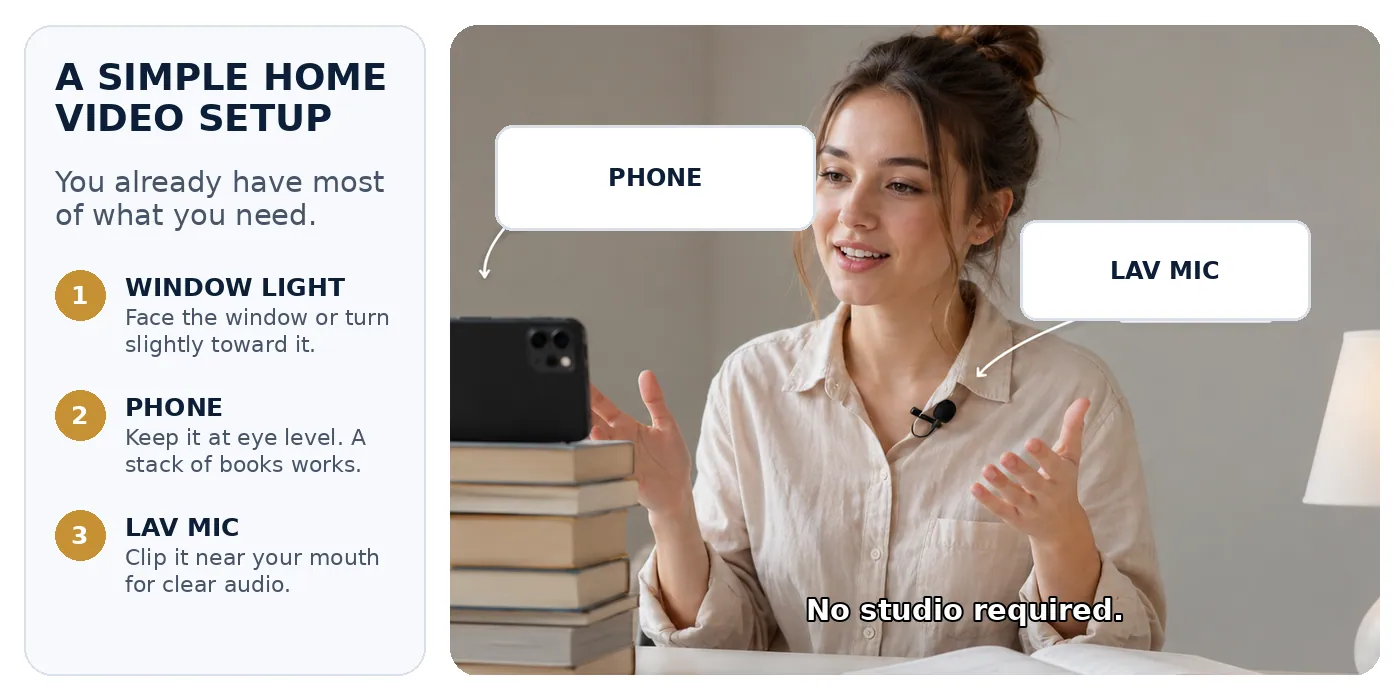
You don't need a professional studio to start streaming; you can launch a basic live stream directly from a mobile phone. However, to stream from a mobile device, YouTube requires you to have at least 50 subscribers, a verified channel, and no active streaming restrictions. Setting this up for the first time can take up to 24 hours. If you haven't reached the 50-subscriber mark yet, you can start by uploading pre-recorded videos or streaming from a computer. Advanced setups with multiple cameras and streaming software are completely optional.
Live streams are useful for:
- Playing games and sharing your screen.
- Cooking, repairing, or painting in real time.
- Streaming an outdoor walk, a local event, or an exhibition.
- Hosting a live Q&A session, lesson, or interview.
Another option is a Premiere. This is when you upload a pre-recorded video in advance, and YouTube plays it live at a scheduled time. You and your viewers watch it together and chat in real time. It isn’t live filming, but it creates a shared viewing experience.
Note: If your channel meets the requirements for YouTube's paid fan funding features, viewers can purchase highlighted messages (Super Chats) and stickers to support you during live streams and Premieres. We discuss these requirements in detail inMOD-12.
4.4. Posts: A Supporting Tool
YouTube Posts are text updates, images, polls, quizzes, music, or videos that can appear on your channel and in other places across YouTube. They work much like posts on a familiar social network: viewers can react, vote, and leave comments.
Posts are useful for:
- Sharing behind-the-scenes photos.
- Announcing an upcoming video or live stream.
- Asking your audience a question.
- Running a poll or quiz.
- Sharing quick updates.
- Resharing an older, helpful video.
Posts support your videos; they are not a fourth video format. On a brand-new channel, a poll may receive very few votes because there is not an active audience yet. That is normal. Use Posts as a simple addition to your videos as your channel grows.
5. Real-Life Example: One Topic, Different Formats and Tools
Let’s see how a home baker can use all of these formats for the same topic:
Long-Form Video
Example: “How to Bake a Sponge Cake That Doesn’t Collapse”
The baker shows the exact ingredients, mixing techniques, oven temperatures, and common mistakes to avoid.
YouTube Short
Example: “How to Smooth Cake Frosting in 30 Seconds”
A quick demonstration of a single technique with a clear, satisfying result.
Live Stream
Example: “Decorating a Holiday Cake Live”
The baker decorates a cake in real time, chatting with viewers and answering questions directly from a phone.
Supporting Post
Example: “Which cake design should we do next week?”
The baker posts photos of two design options and runs a poll to let the audience decide.
YouTube Studio & Playlists
The baker uploads and manages all these videos using YouTube Studio, then organizes them into a playlist called “Cake Decorating 101.”
What is a Premiere? A Premiere allows you to upload a pre-recorded video in advance and play it live at a scheduled time. You and your viewers watch it together and chat in real time. It is not live filming, but it creates a shared viewing experience.
This same approach works for car repair, fitness, gardening, travel, academic tutoring, or product reviews.
6. Quick Exercise: Jot Down Your First Ideas
Before we go any further, take a moment to write down three quick notes for yourself. This will help you apply today's lesson to your future channel:
1. Your Goal (Why do you want a channel?):
2. Three Topics You Know:
3. Your Resources (Time, equipment, editing comfort):
These quick notes will make it much easier to complete the exercise at the end of the lesson.
7. Putting It Together: Choosing Your First Format
Once you know your goal, your topics, and your resources, you can choose your starting format:
1. Match the Format to the Viewer’s Need | 2. Be Realistic About Your Resources |
Long-form Widescreen If you need to explain a detailed process, show a sequence, or compare items. | Equipment You can do everything on a standard smartphone. Do not let gear hold you back. |
YouTube Shorts If you want to show a single trick, highlight a product, or show a fast result. | Editing Editing should not be a barrier to starting. Your first videos can be recorded in one take or with simple cuts. |
Live Stream If you want to share a real-time event or talk directly to your audience. | Time & Focus Choose a format you can produce consistently without burning out. |
Start by focusing on one primary format. If you choose Shorts, dedicate your energy to making good Shorts and use Posts only when they support a clear purpose.
To build a reliable foundation, look for evergreen content—topics that stay helpful and relevant for months or years. Examples include basic recipes, simple home repairs, foundational tutorials, plant care, and guides to fixing common mistakes. Trending topics can also work, but they often demand faster research and production.
8. How to Choose Your Niche and First Format
Do not choose a niche only because someone says it is hot or promises that it is making millions right now. Maybe the topic can earn money, but that does not mean it is the right first direction for you. Use these five steps:
- Name your goal: clients, product sales, visibility, community, advertisers, future platform revenue, or simply sharing useful experience.
- Write down three familiar topics: areas you can genuinely explain or show because you know them, practice them, or can learn them consistently.
- Decide what the viewer will see: detailed steps in a long-form video, one result in a Short, something happening now in a live stream, or a poll/update in a Post.
- Check your resources: time, phone or computer, and whether you can record without complex editing, such as one-take videos or simple cuts.
- Choose one first test inside the niche: one long-form video, one Short, one live stream, or one supporting Post. This is a test, not a lifetime decision.
Evergreen content means topics that can stay useful for months or years: basic recipes, simple equipment repairs, beginner tutorials, plant care, or explanations of common mistakes. Trend-based content can also work, but it usually requires faster research and production.

Two notes for a new channel. A live stream is easier when people already know the time and have a reason to come. Posts are also more useful when an audience already exists, so at the beginning they usually work best as support for videos, not as the only way to grow the channel.
A Premiere is not a live stream. The creator uploads a finished video in advance, schedules a time, and viewers watch it together while chatting.
9. The Financial Reality: No Illusions
Your choice of topic and format will shape how your channel grows, but no format guarantees income.
Value and Clients Come First
If you offer services or sell products, you do not need to wait for YouTube to monetize your channel. A horizontal video can demonstrate your expertise to a potential client today, a Short can quickly show off a handmade product, and a live Q&A can answer a buyer’s questions. You can gain clients and build business value from your very first views.
Ad Revenue is a Long-Term Milestone
If your goal is to earn ad revenue directly from YouTube, you will need to apply for the YouTube Partner Program (YPP). Keep in mind these official requirements (current as of June 18, 2026):
- For horizontal (long-form) videos: You need 1,000 subscribers and 4,000 valid public watch hours over the past 12 months.
- For Shorts: You need 1,000 subscribers and 10 million valid public Shorts views over the past 90 days.
View these requirements as a long-term milestone, not a barrier that prevents you from starting. Remember: getting millions of views does not automatically guarantee a large paycheck. Your actual earnings depend on where your viewers live, your channel's topic, and the advertisers in your niche. We cover these monetization models in detail in MOD-12.
10. Supporting Tools (What They Actually Are)
Beginners often mix up content formats with management tools. Let's look at what they actually do.
YouTube Studio
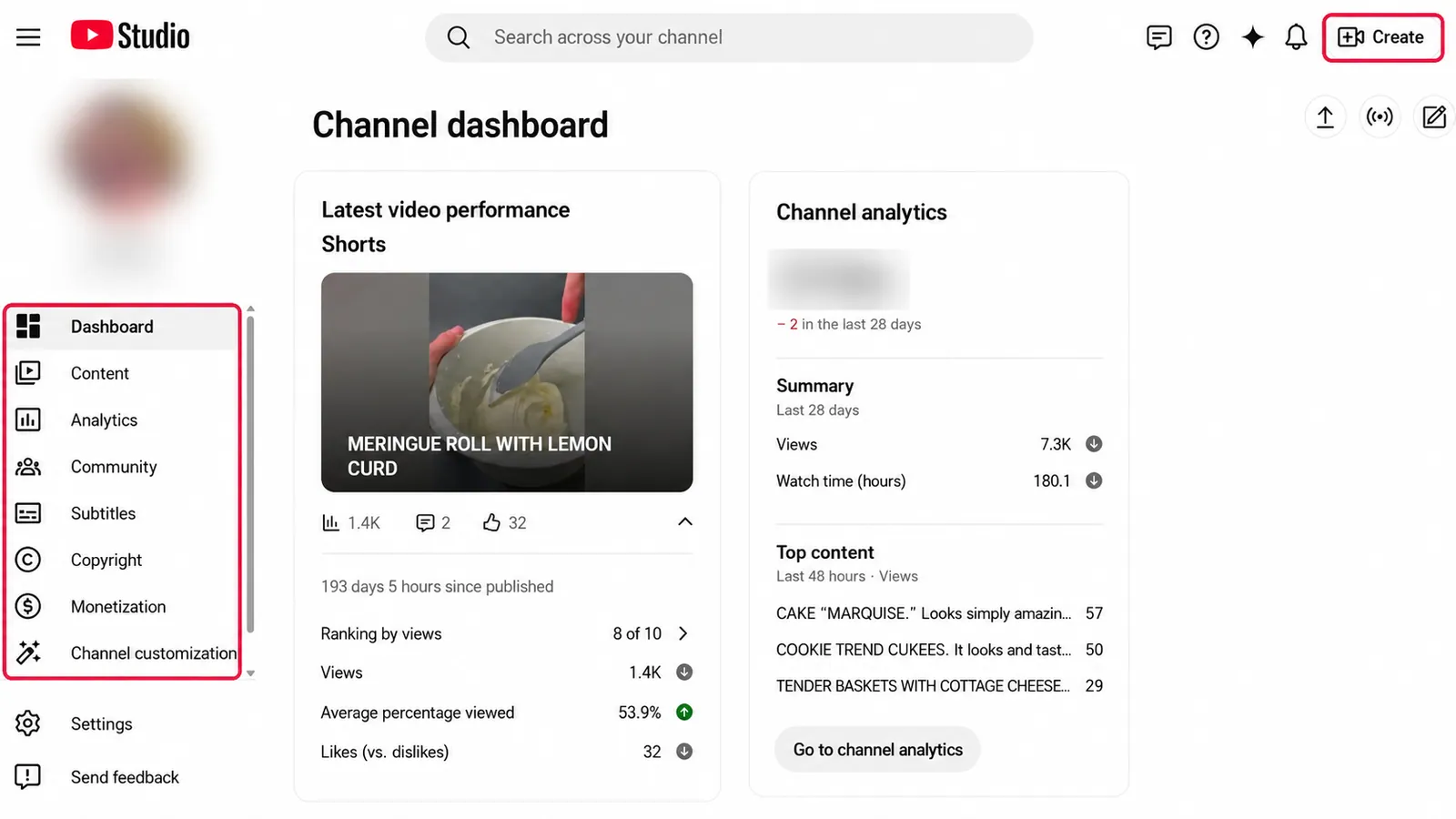
YouTube Studio is the private dashboard where you manage your channel. Your viewers do not see it.
Inside YouTube Studio, you can:
- Upload and schedule your videos.
- Write your titles and descriptions, and upload your thumbnail images.
- Manage comment settings and video visibility.
- Add subtitles.
- Adjust video settings and add links to your other content.
- Manage your live streams.
- Read viewer comments and review your channel's analytics.
- Edit basic details of videos that are already public.
Note: This is just an overview. We will walk through YouTube Studio step-by-step in later modules.
Playlists
A playlist is a collection of related videos grouped together, like folders on a computer or shelves in a cabinet. You might name them "Breakfast Recipes," "Engine Repair Guides," or "Sewing Basics for Beginners." Playlists help viewers find what they need and guide them to watch your next video. They are a way to organize your content, not a format for filming.
Public Channel Page (Viewer View)
This is your channel's public storefront. It's what viewers see when they search for your name, browse your playlists, or read your community updates.

Private YouTube Studio Map
This is your private backend dashboard. It shows how and where to upload videos, edit descriptions, organize playlists, and read your channel analytics.

11. Common Beginner Mistakes
Trying to use every format at once.
Keep it simple. Pick one primary format for your launch and focus on getting comfortable with it.
Choosing a topic just because someone promised it makes fast money.
If you aren't genuinely interested in the topic, you will struggle to make videos consistently.
Going live without a clear reason.
A live stream needs a purpose to keep viewers engaged—like answering questions, demonstrating a live process, or hosting a discussion.
Treating Shorts as random, cut-up pieces.
A vertical video must make sense and deliver value on its own, even if it is short.
Worrying too much about copyright on day one.
To start safely, only use music and video that you have the rights to use. Content ID is YouTube's automatic system that scans uploads for copyrighted music and video. A Content ID claim usually applies only to a specific video and does not mean your channel will be deleted. However, on Shorts longer than one minute, an active copyright claim can block the video globally. The safest approach is to use music from YouTube's built-in Shorts library or the free YouTube Audio Library. We will cover copyright rules in detail in later modules.
12. Practical Task: The Niche and Format Decision Matrix
Fill out this matrix for two specific viewer needs. You do not need to make a final decision about your channel's niche right now. Treat each row as a working idea, not a lifelong commitment. The goal is to connect a viewer's need with a suitable format, consider the closest alternative, and be honest about the trade-off.

My Decision Matrix (Workbook Worksheet)
Define two distinct viewer needs from your interest areas. Choose the format, explain why it fits, list alternatives, and acknowledge production trade-offs and supporting tools.
Viewer Need 1
1. Viewer’s Need:
2. Main Format:
3. Why It Fits:
4. Closest Alternative—and Why It Fits Less Well:
5. Main Trade-off:
6. Supporting Tool:
Viewer Need 2
1. Viewer’s Need:
2. Main Format:
3. Why It Fits:
4. Closest Alternative—and Why It Fits Less Well:
5. Main Trade-off:
6. Supporting Tool:
Readiness Checklist:
- Written down two different viewer needs.
- Selected a main format for each need.
- Explained why the format fits the viewer's goal, rather than just choosing it because it is popular.
- Named the closest alternative and explained why it fits less well.
- Listed one real-world production trade-off.
- Added one supporting tool that has a clear job.
- Avoided choosing a format based on quick hype or empty income promises.
Additional Resources and Creator Chat
The course Telegram community
Creator Tools on Threads for tips and observations