Module 12. Monetization: YouTube Monetization Requirements and 16 Ways to Make Money
How many subscribers and watch hours you need in 2026 and 2027, 16 ways to earn from a channel, why channels get rejected and what YouTube pays per thousand views in different countries. Plus how to turn on ads and get paid when AdSense doesn't work in your country.
1. Why this lesson matters
"So, is YouTube paying you a lot yet? Ready to quit your job?" A coworker asked Emma that on Friday after finding her quick weeknight dinner videos. Emma has 430 subscribers, her videos get 500 to 1,000 views each, and YouTube has paid her nothing so far.
The same day Paul got an ad for a course: "Passive income from $5,000 a month! AI finds trending videos, cuts up other people's cartoons and uploads them to your channel. All you do is sit back and collect the money once a month!" Paul fixes bikes in his garage and films it, and for a second he wondered why he bothers with lights and a decent mic.
2. The main idea
YouTube shares advertisers' money with creators and lets you earn from viewers and from businesses: ads in your videos, tips and memberships, affiliate links, your own store right under the video. The money comes when real people watch your videos, and the more countries watch, the more you make.
3. New words in this lesson
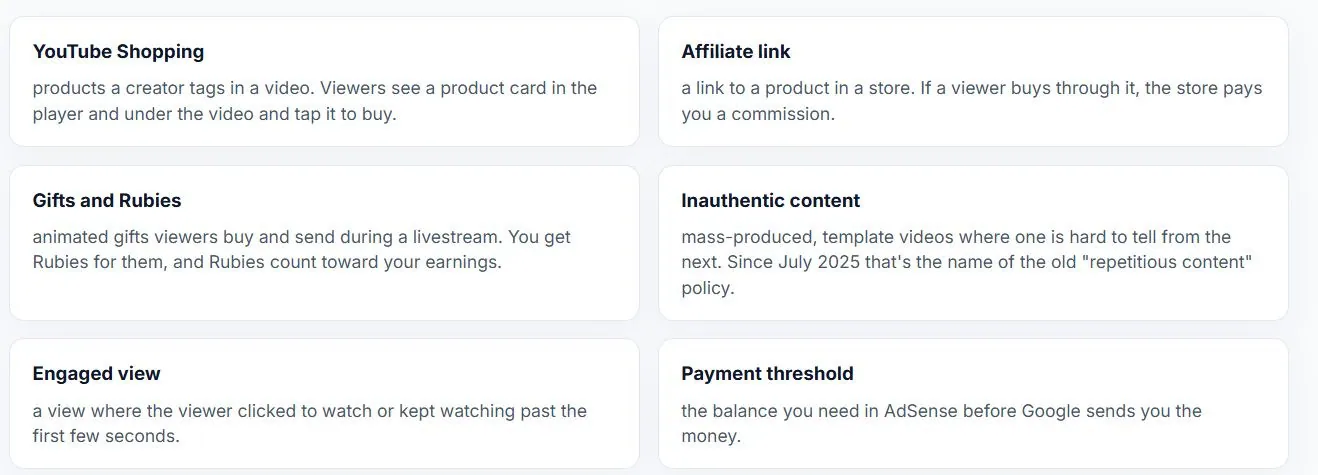
We covered the Partner Program, RPM, Content ID, strikes, Super Chat and memberships in Module 1. Here are only the new ones.
4. The two tiers of the Partner Program
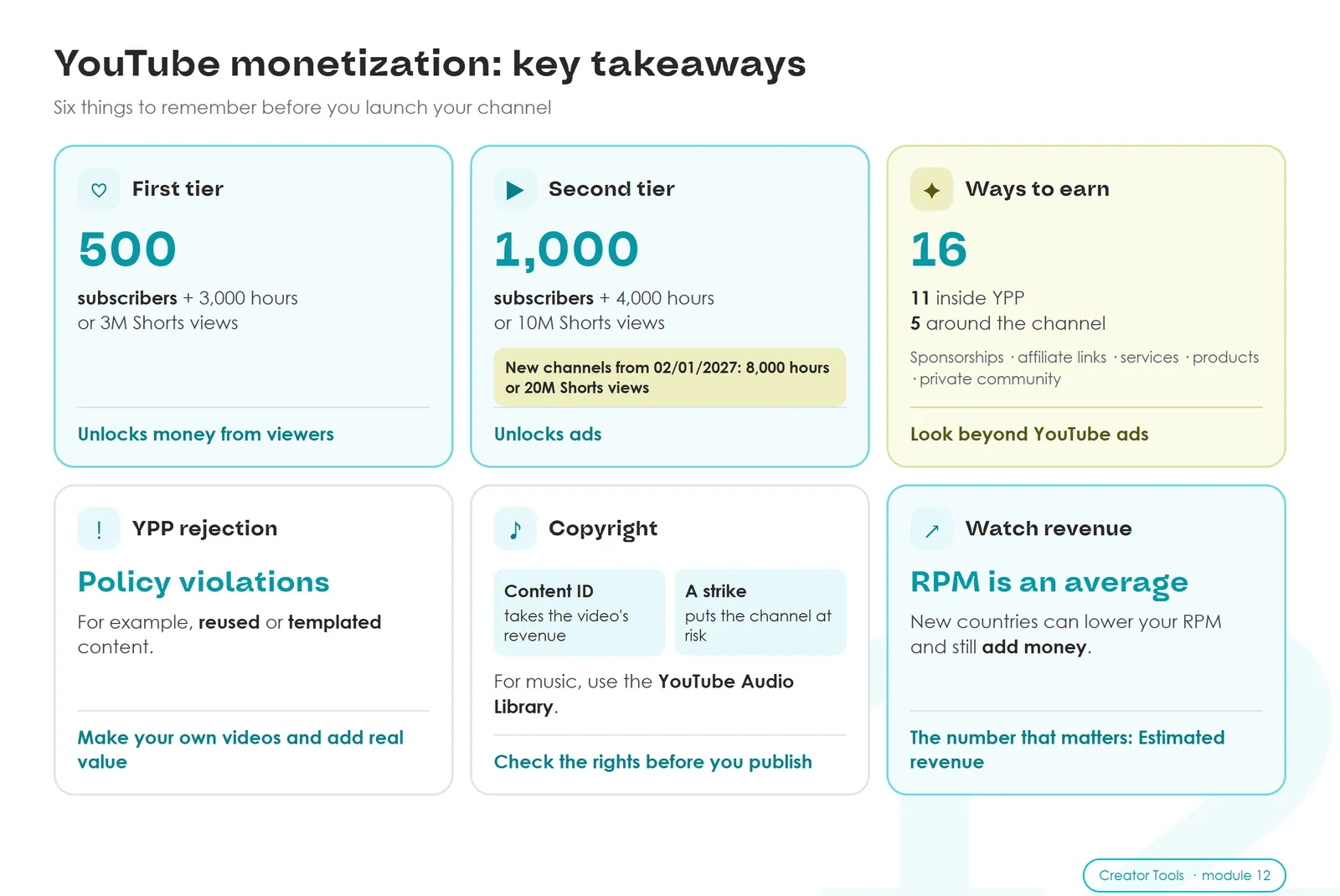
You join the YouTube Partner Program in two steps. The first tier unlocks money from viewers. The second adds ads.
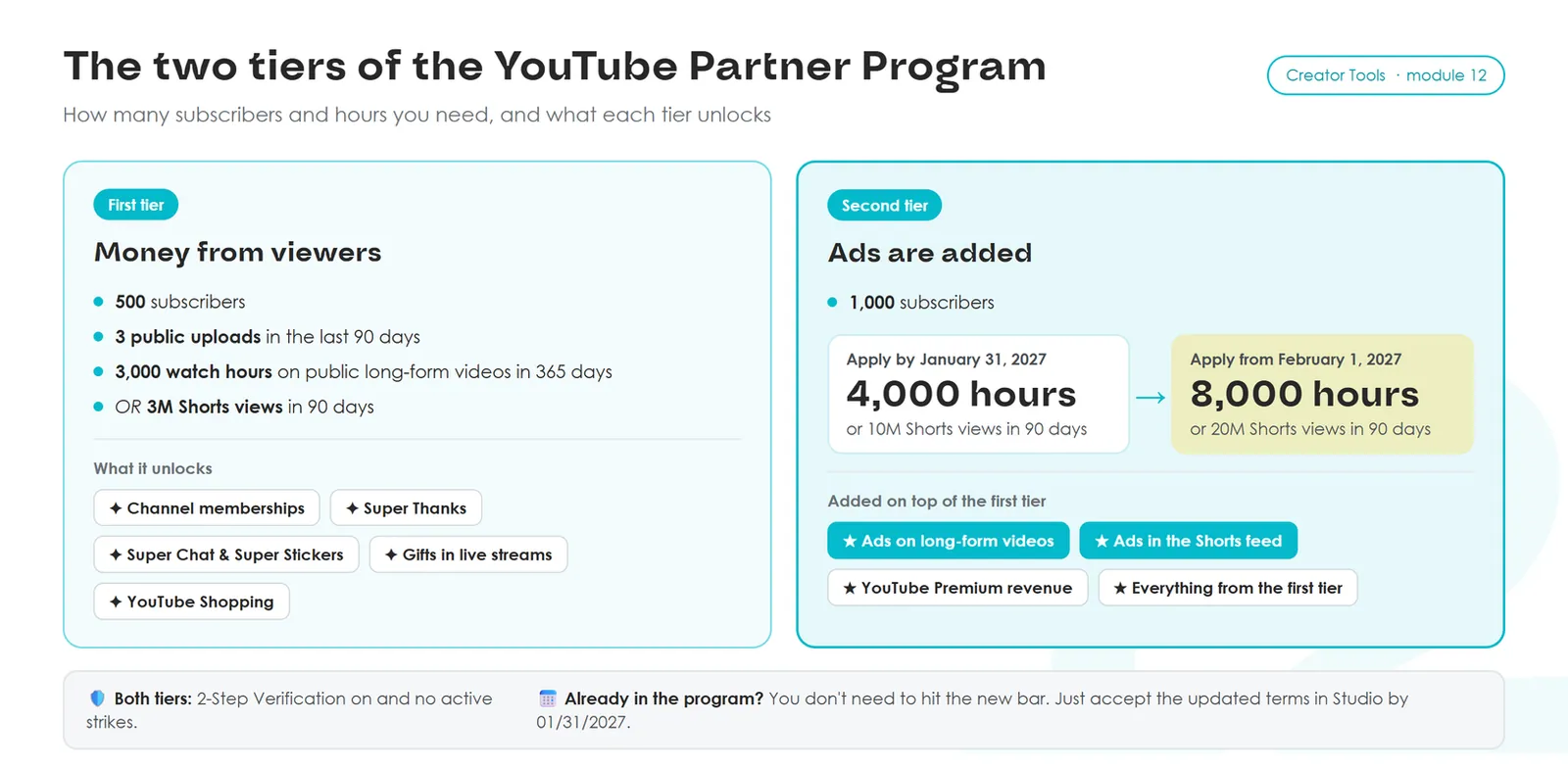
Watch hours and Shorts views don't add up. For the second tier, 2,000 hours plus 5 million Shorts views won't count. You need one of them in full: the hours or the Shorts.
Both tiers also need three things: 2-Step Verification turned on in your Google Account, no active Community Guidelines strikes, and a country where the Partner Program is available. Check the list in YouTube Help before you plan anything.
From February 1, 2027, the bar for ads doubles for new channels: 8,000 hours instead of 4,000, or 20 million Shorts views instead of 10 million. From the same date, only channels with 10 million Shorts views in the last 90 days get a share of Shorts feed ad revenue. Everyone else stays in the program and keeps earning from long videos. Details are in YouTube Help and on the official blog.
Hours count over the last 365 days
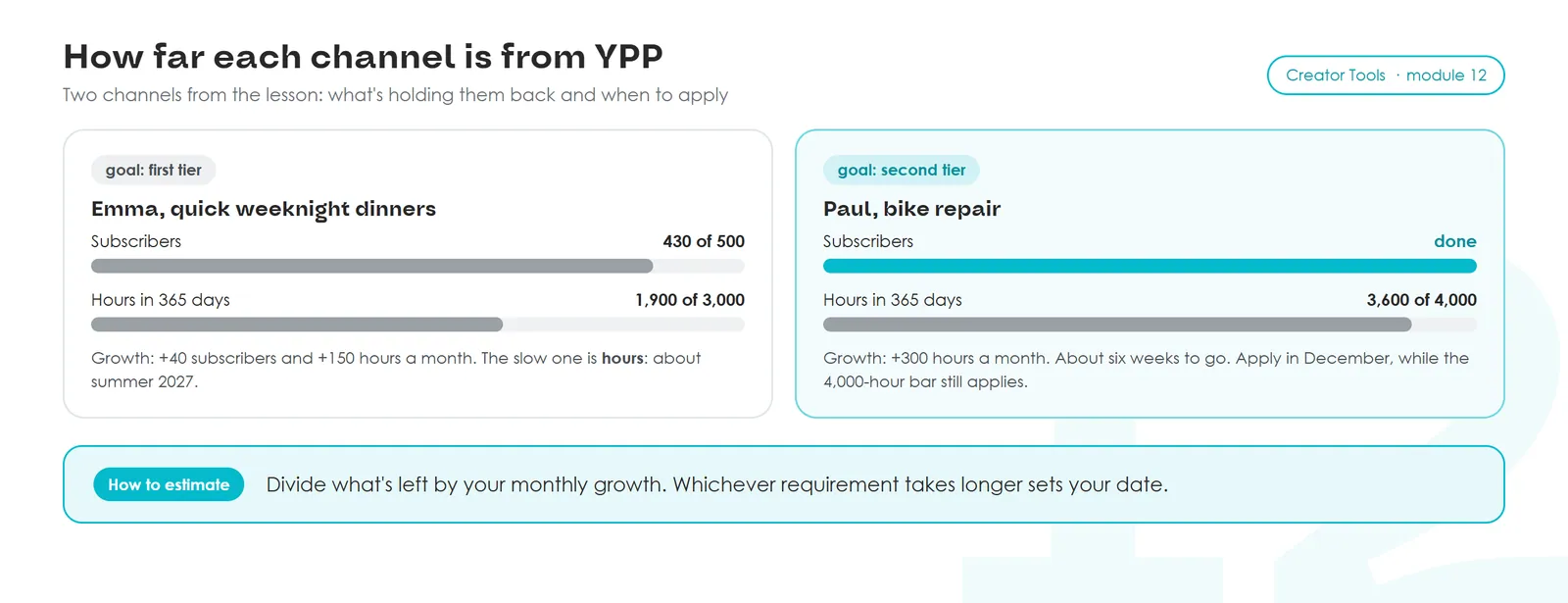
The 365-day window moves forward every day. A channel that posts three hit videos and goes quiet slides back a year later.
Where to see your numbers
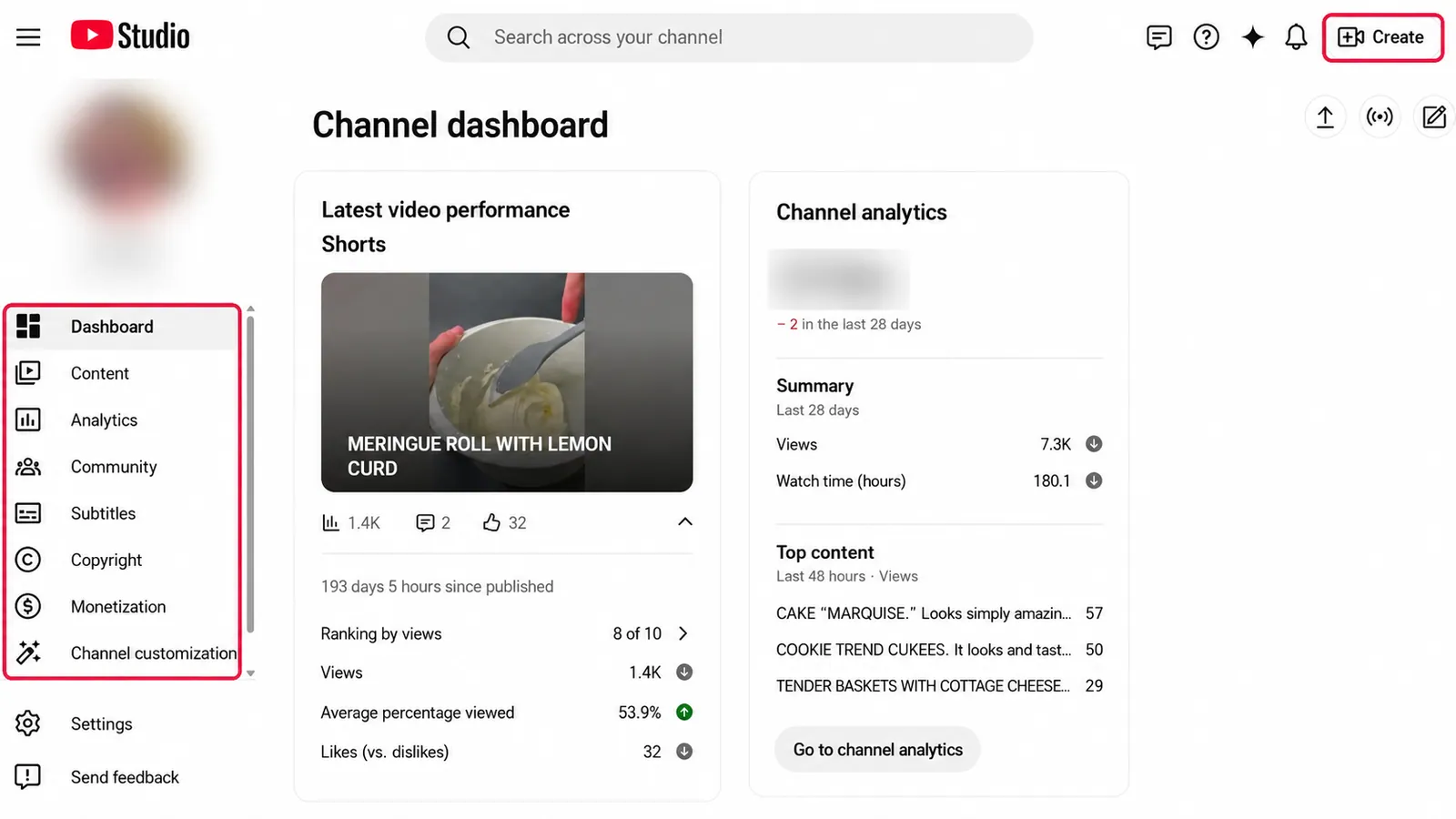
Go to studio.youtube.com and click Earn in the left menu. Under Requirements, Studio shows your subscribers, watch hours over 365 days and Shorts views over 90 days, and the bars show how far you are from each threshold.
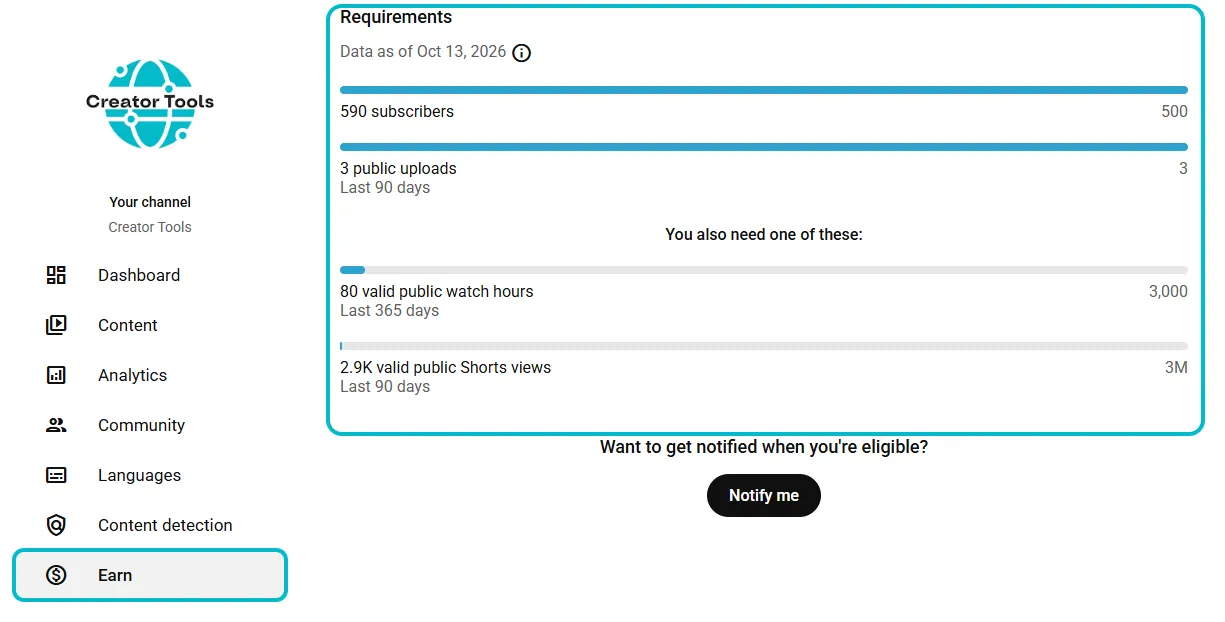
The numbers under Requirements can lag by up to a week, because YouTube checks views for fake traffic first. Hours you see in Analytics today will show up here later.
Paul is already in the first tier, so Super Chat and memberships are open to him, and ads are next. Emma needs hours for the first tier, and she can't film twice as much: she works and cooks dinner after work. So she folds the sauce variation and answers to comment questions into the main recipe instead of filming them as separate short videos. The video grows from 5 minutes to 10–12 with no extra shooting. If viewers watch to the end the same way, her hours double, and she reaches the first tier in spring instead of summer.
5. Every way YouTube pays
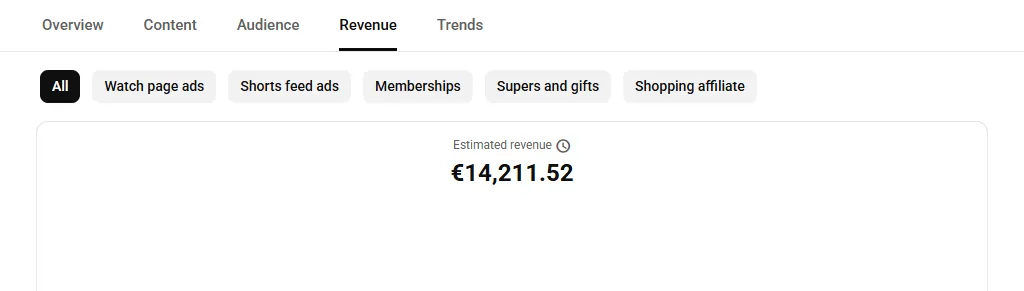
Once you're in the program, Studio adds Analytics → Revenue. That's where YouTube breaks your money down by source. Which tabs you see depends on what's turned on for your channel.
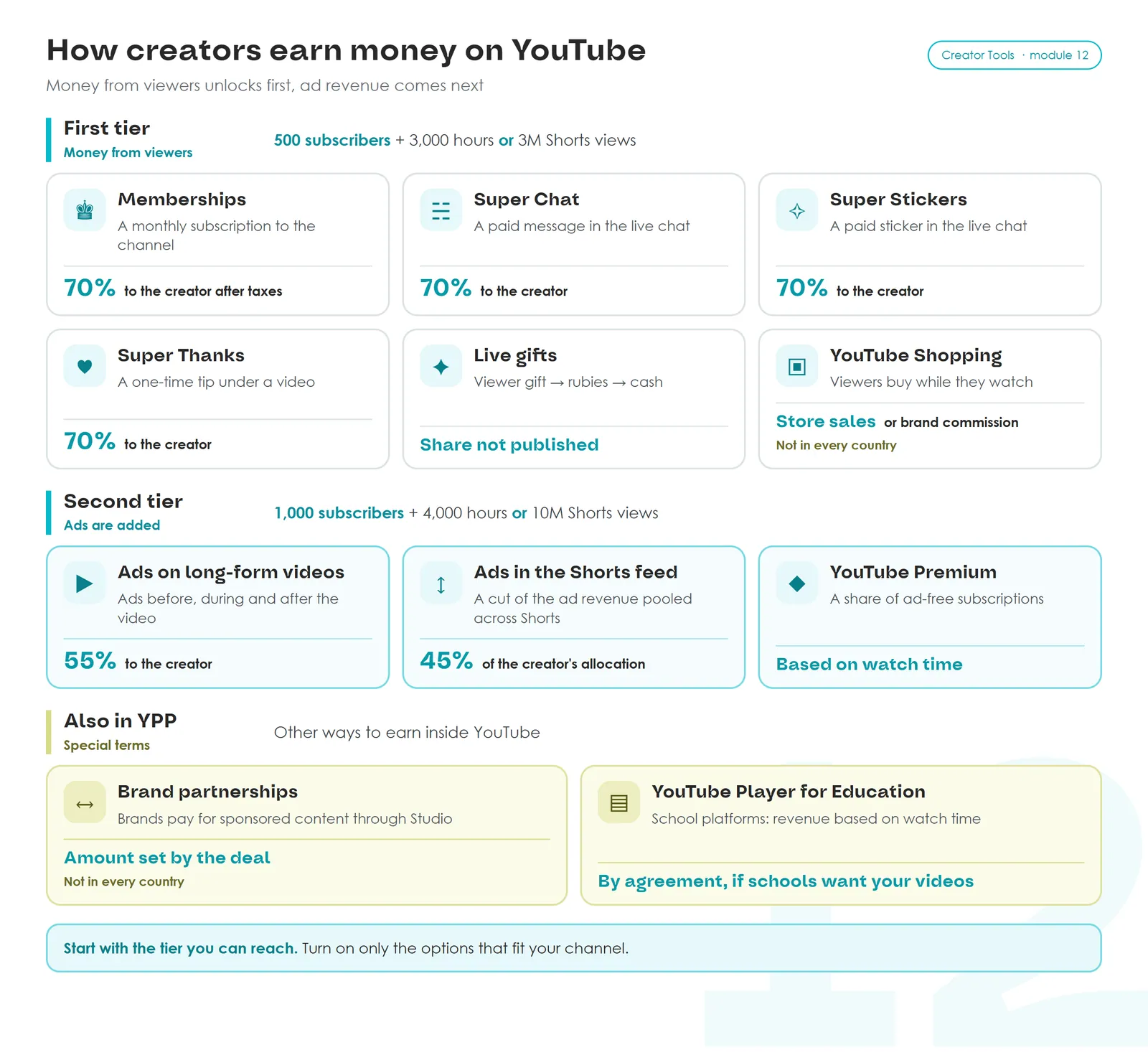
- Shorts pay less than long videos. Ad money from between Shorts goes into one monthly pool. Music licensing comes out first, the rest is split among creators by views, and you keep 45% of your part. A million Shorts views usually earns a lot less than a million views on long videos.
- A livestream earns several ways at once. Ads (in the second tier), plus Super Chat and Super Stickers, paid messages and stickers that stand out in the chat. Then there are gifts: a viewer buys an animated gift and you get Rubies, which count toward your livestream earnings (YouTube Help). Paul runs a monthly "Fix Your Bike" stream and answers Super Chat questions first.
- Player for Education. If schools use your videos, YouTube sends you an agreement, and you can accept it on the Earn page (YouTube Help).
YouTube Shopping: products right in the video
You tag products in your video: your own from a connected store, or other brands' through the affiliate program. Viewers see a product card in the player at the moment you talk about it and under the video, tap it and head to checkout while they're still watching. You earn your store's sales or a commission from the brand.
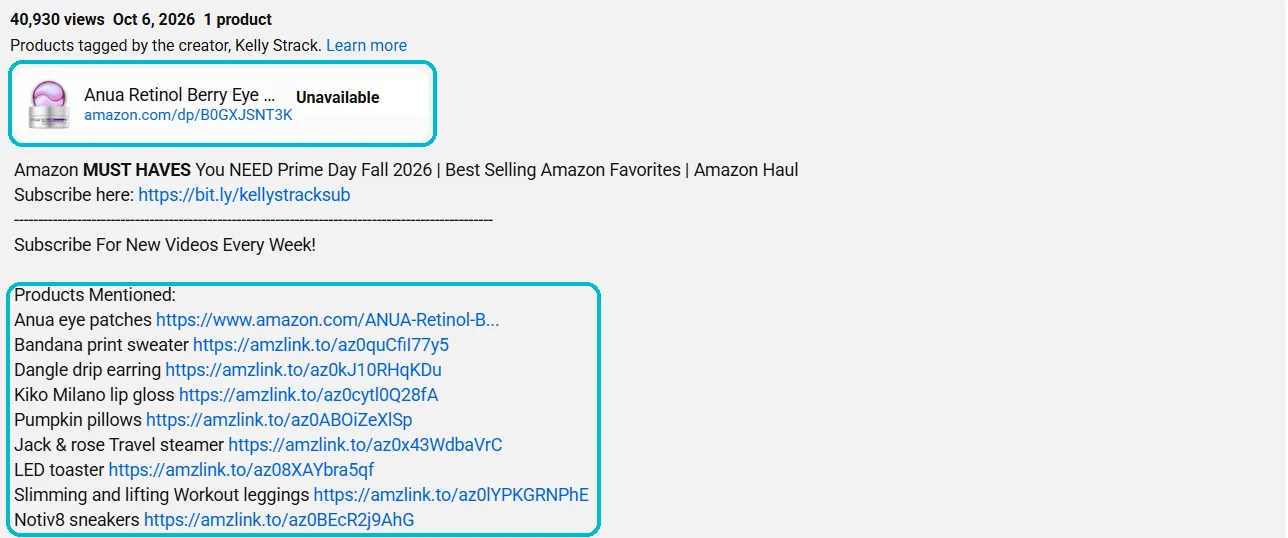
Shopping and brand partnerships aren't available everywhere. The country lists change, so check YouTube Help for Shopping and for brand partnerships.
Bottom line. Right now YouTube gives creators 16 ways to earn: 11 inside the Partner Program, shown above, and 5 around the channel, covered in section 10. You don't need all of them. Paul goes for livestreams and Super Thanks, because his viewers thank him for specific fixes. Emma bets on longer recipes and memberships with members-only weekend recipes. A math tutor collects Super Thanks under worked problems and runs a members' club. A gardener who never shows their face tags seeds and tools with YouTube Shopping.
Do it now. Pick three sources from the picture that fit your channel, and for each write one line: what exactly does a paying viewer get?
6. Channel review: why channels get rejected
Subscribers and hours only get you to review. After you apply, YouTube reviewers look at a sample: your channel's main theme, your most popular and newest videos, the videos with the most watch time, titles, thumbnails, descriptions and the About section (YouTube Help).
Channels get rejected for breaking YouTube's rules: the channel monetization policies, the Community Guidelines, copyright or the advertiser-friendly guidelines. Reused content is one of those violations. Others include mass-produced template videos, shock content with no point, and AI characters posing as doctors, lawyers or financial experts.
Approved or rejected: examples
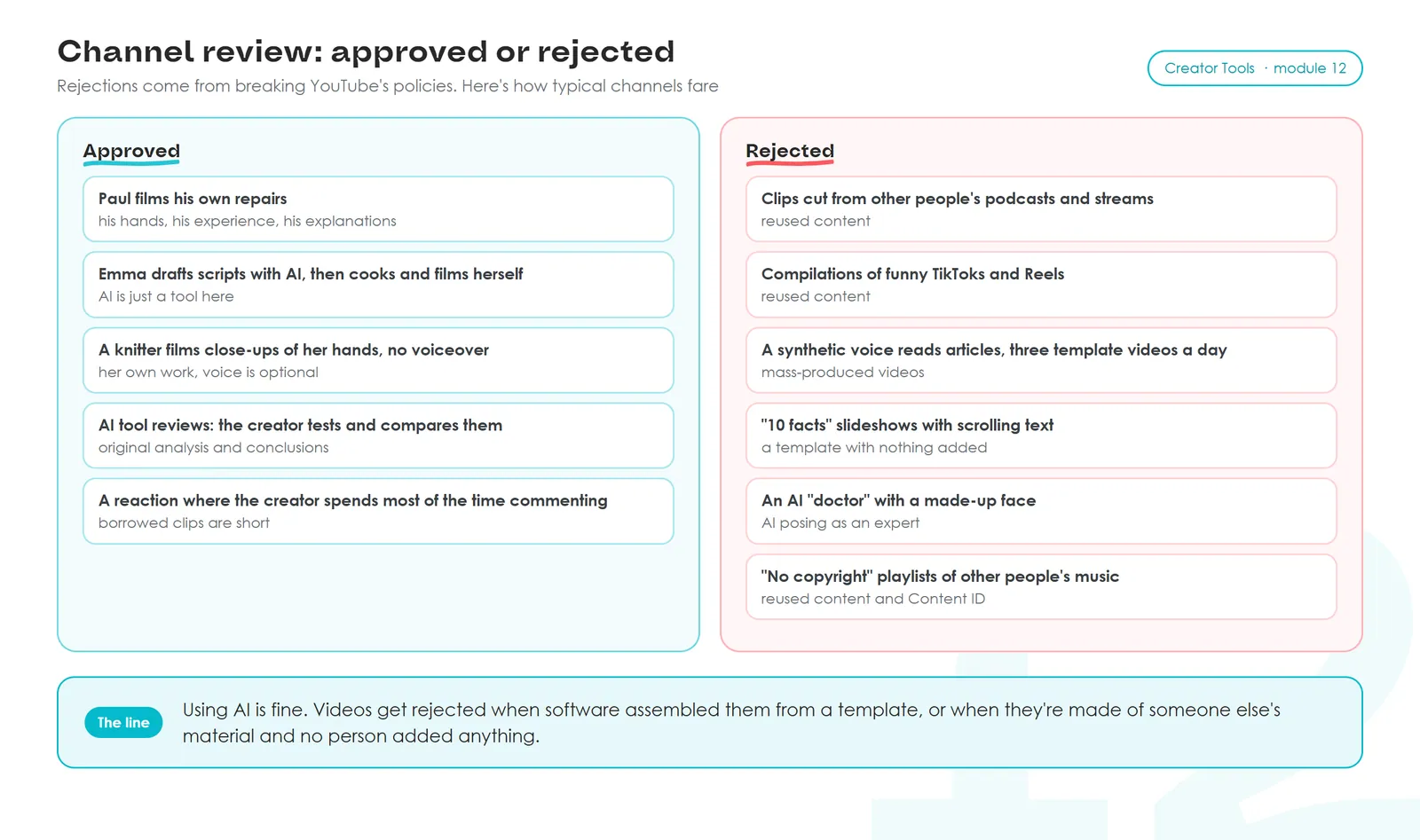
Compare Emma with the synthetic-voice channel in the picture. Both use AI. Emma still cooks and films herself, while the other channel is assembled by software from a template.
Courses that sell stealing
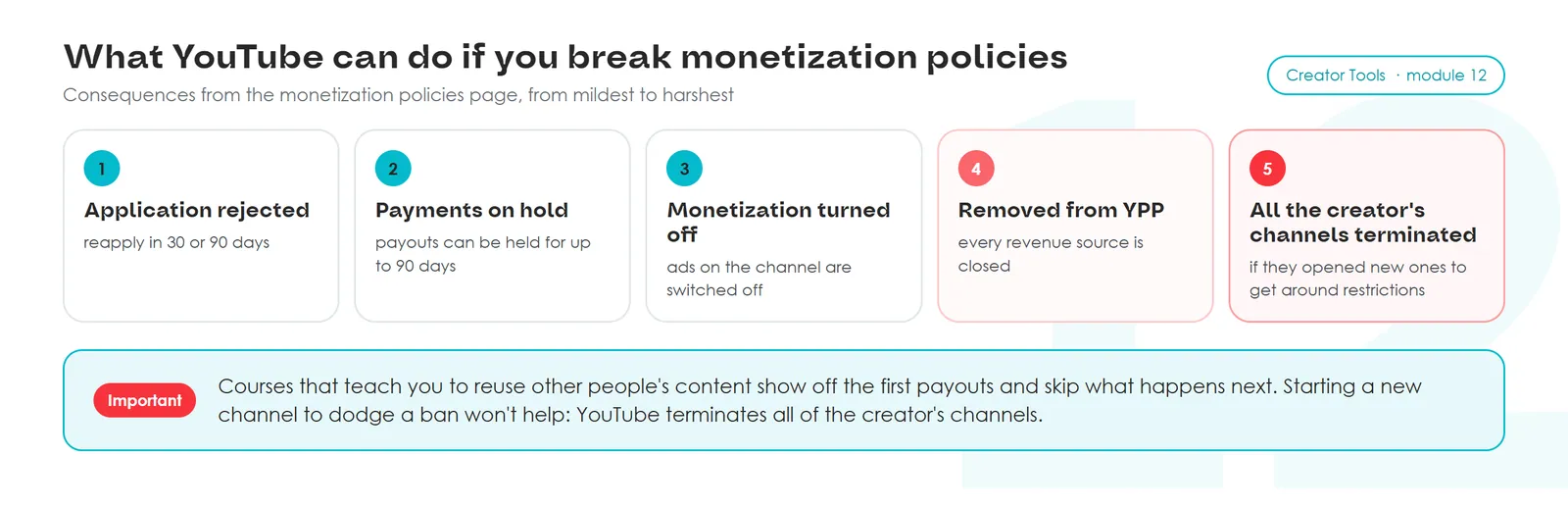
The ad Paul saw sells one idea: take other people's work and make money from it. "Cut up other people's cartoons," "re-upload foreign channels with AI dubbing," "stitch together TikTok compilations." These courses usually show screenshots of the first payouts and stay quiet about what happens next.
What happens next can go well beyond a rejection (YouTube Help):
If you're rejected
You can appeal within 21 days. YouTube asks some creators to record a video under 5 minutes, set to unlisted, showing how the channel's videos are made. Others appeal through Creator Support. You'll hear back within 14 days. Don't delete videos while the appeal is open (YouTube Help).
You can reapply 30 days after the rejection email. If it's not your first rejection, or you've already reapplied once, the wait is 90 days (YouTube Help). Use that time to remove or hide questionable videos: reviewers look at a sample, and one old re-upload can spoil the whole picture.
The monetization icon on every video
Once you're in the program, every video under Content gets a dollar icon (YouTube Help):
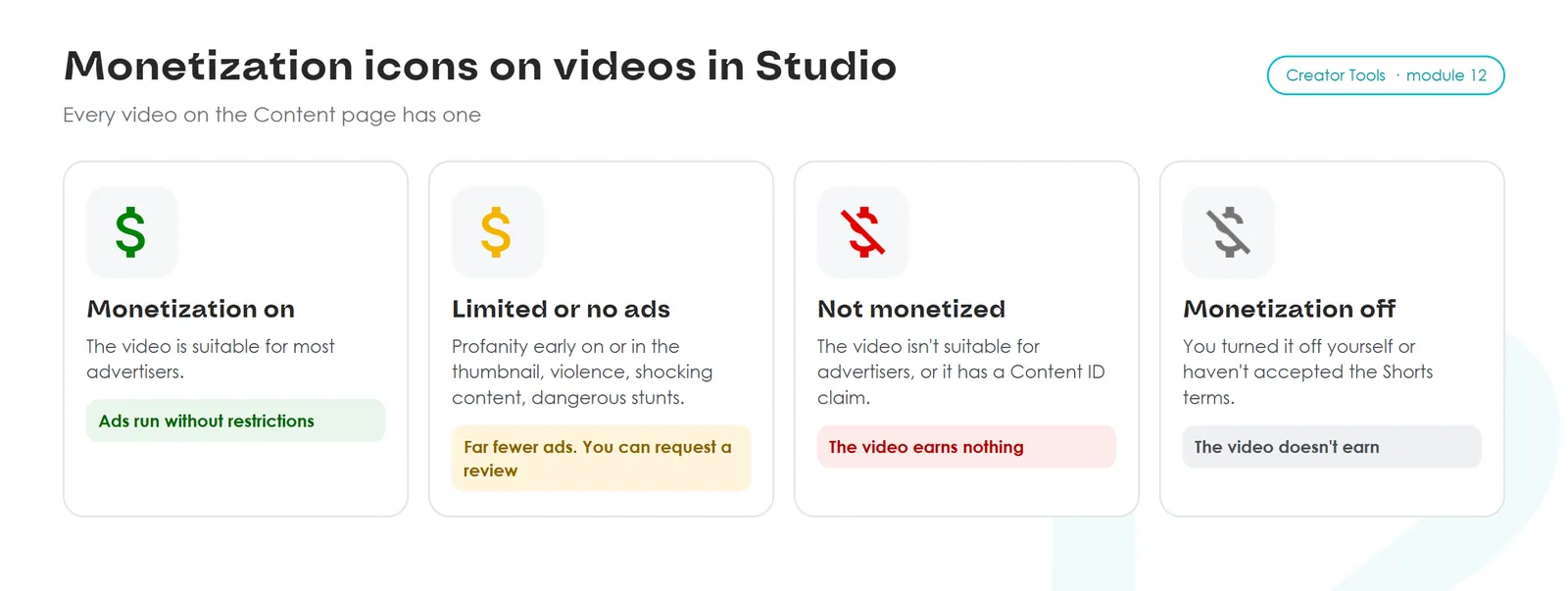
You can push back on a yellow icon. Under Content, hover over the video's status and request a human review. It can take up to seven days, and the answer comes by email. If you're sure the video follows the guidelines, send the request. Once the status says Confirmed by review, it can't be appealed again.
Do it now. Look at your five most popular and five newest videos the way a reviewer would. Is there one with more of someone else's material than yours? Delete it or make it private now, before you apply.
7. Music and other people's footage: Content ID and strikes
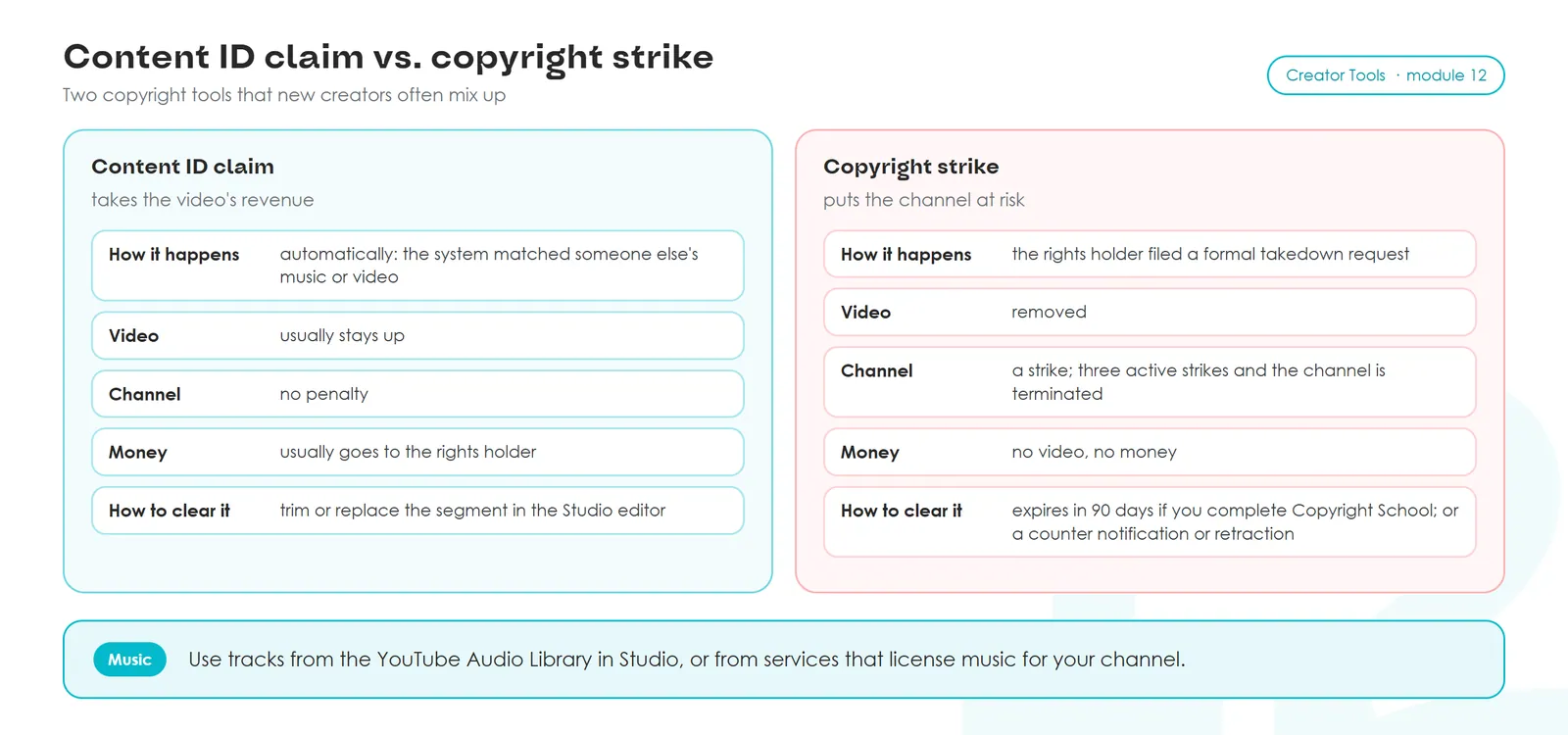
You can clear a Content ID claim in the Studio editor: Content → video → Editor. A strike expires after 90 days only if you complete Copyright School. You can also file a counter notification or ask the copyright owner to retract the claim (YouTube Help).
Get music from the YouTube Audio Library (Audio Library in the Studio left menu) or from services that license music to your channel. Ten seconds of a hit song behind a twenty-minute video usually hands that video's revenue to the label.
8. If monetization isn't available in your country
Sometimes YouTube ads are switched off in a country, AdSense doesn't work there, or you can't open a new account. You can keep running the channel. There are two ways to turn on ads, and a third one helps when you already have AdSense but getting the money to your bank is a hassle. Sponsorships, affiliate links and your own services work in any country without AdSense (section 10).
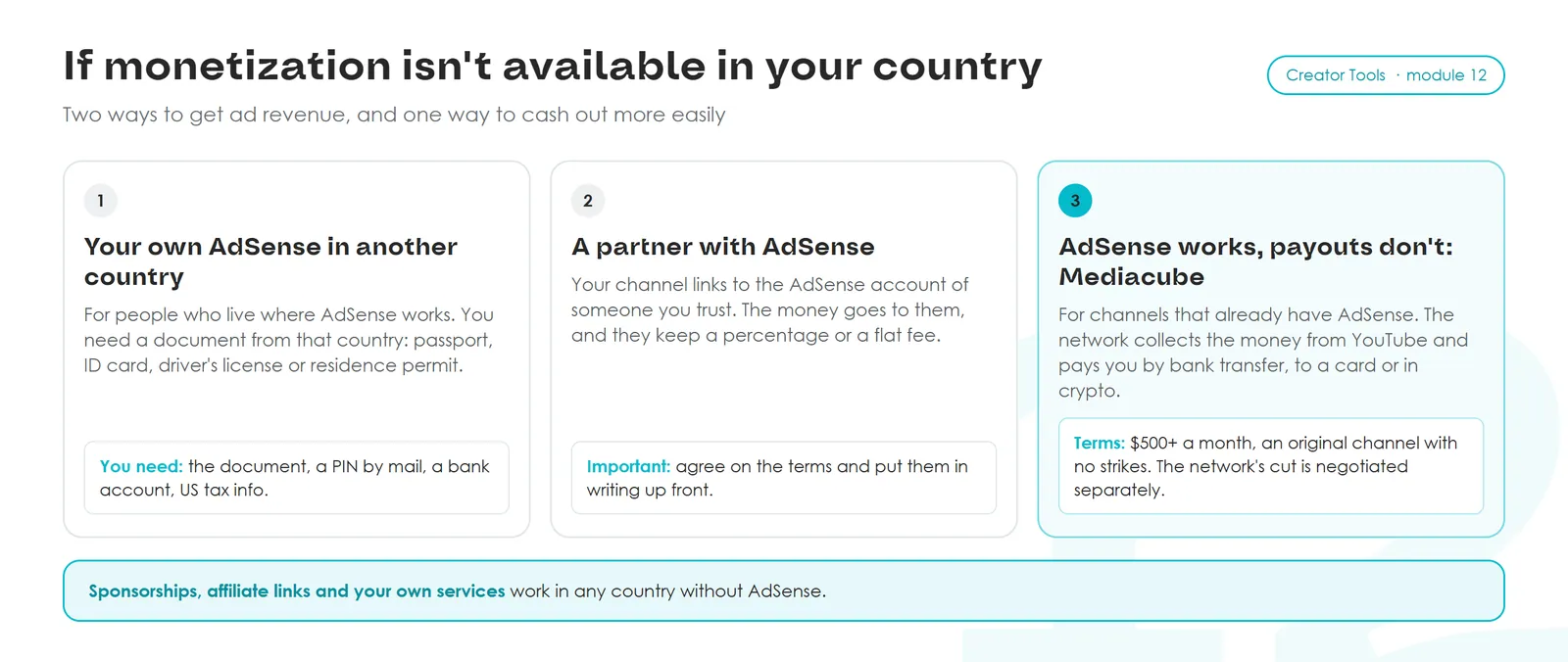
Route 1. Your own AdSense in another country
This works if you live in a country where AdSense works, or you've moved there. In your channel settings (Settings → Channel → Basic info), set the country where you live and open AdSense. Here's what Google asks for:
- A photo ID issued by the country in your AdSense payment details. A passport, national ID card or driver's license works. If you're a foreign resident, a residence permit from that country works too: we've been verified with one. The online check takes about 10 minutes, a face scan plus a photo of the document. You have 45 days from the first request, after which ads on the channel stop.
- Address verification. Google mails a regular letter with a six-digit PIN. It takes 3–4 weeks to arrive, and you have 4 months to enter it. Three wrong tries in a row, or missing the deadline, turns off monetization on the channel.
- A bank account in your name for payouts.
- US tax info, filled in online inside AdSense. Without it YouTube withholds tax at the maximum rate.
Payouts arrive between the 21st and 26th of the month once your balance reaches the threshold: $100 for a US dollar account, €70 for a euro account, other currencies have their own amounts (threshold table).
Google updates its requirements from time to time. See the current list of documents in AdSense Help on identity verification, and the PIN process in YouTube Help.
Route 2. A partner with a working AdSense account
If someone you trust has a verified AdSense account in a country where the program works, your channel can be linked to their account. The account is real, in their name and their country: you don't enter anything of your own, they link your channel to their AdSense, pass the identity and address checks and handle the taxes. Every arrangement is different. Some take a percentage, some a flat monthly fee. The money lands in your partner's AdSense and legally belongs to them, so pick someone you'd trust with your savings. Agree on everything in advance and write it down: how often you settle up, how you transfer the money, what happens if one of you wants out.
Route 3. AdSense works, payouts don't: Mediacube
For channels with steady views, we recommend joining the Mediacube partner network. We covered what networks are and why you should read the contract first in Module 1. The network receives your payouts from YouTube and sends them on to your local bank, your card or in crypto.
Mediacube only takes channels that already have AdSense. The other requirements:
- the channel gets enough views to earn $500 a month or more from ads;
- it's an original channel with no Community Guidelines violations, no strikes and no reused content;
- the network's percentage is agreed with each creator individually.
The check is easy: in Studio, open Analytics → Revenue and look at Estimated revenue for the last 28 days. If it's $500 or more, you qualify. For scale, at $1.50 per thousand views, $500 a month takes about 330,000 engaged views. The YouTube blog explains what counts as an engaged view.
The network charges a withdrawal fee. A bank account or card is cheapest. Crypto costs more, and TRC20 and ERC20 there are two ways of sending the same coin at different prices. As of October 2026 the fees are:
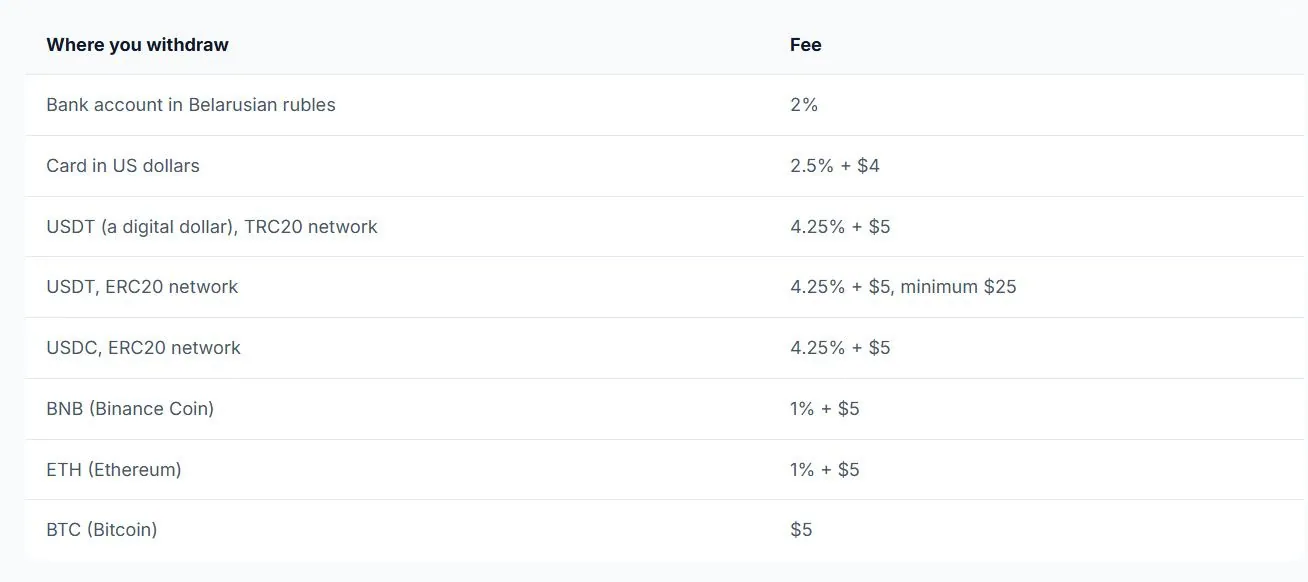
These numbers may change while you're taking the course. Before you sign up, you'll get the full terms up front and can decide with everything in front of you.
If you already have a channel like this, write to us at info@creator-tools.com. We'll walk you through the details and help you get connected.
Do it now. Check your country in the list of Partner Program countries. If it's not there, pick one of the three routes or one of the options in section 10, and write down a first step you can take this week.
9. RPM: what YouTube pays per thousand views
Make-money-on-YouTube courses love one hook: "The US pays $15 per thousand views. Make videos for Americans and you'll be living off passive income in six months." Then they sell "secret niches," "the right countries" and "high-RPM strategies."
What RPM is
RPM is how much you earned on average for every thousand views (Module 1 covered how it differs from CPM). In Studio the card is labeled RPM and sits on the Revenue tab.
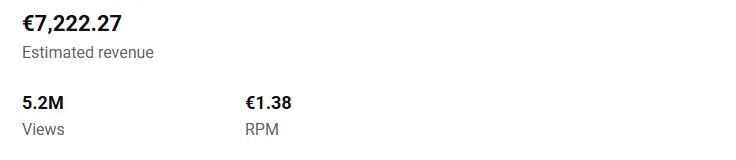
RPM includes all the money that went through YouTube: ads, Premium, memberships, Super Chat and Super Stickers. YouTube's share is already taken out. All of it is divided by all your views, including the ones with no ads (YouTube Help).
What drives RPM
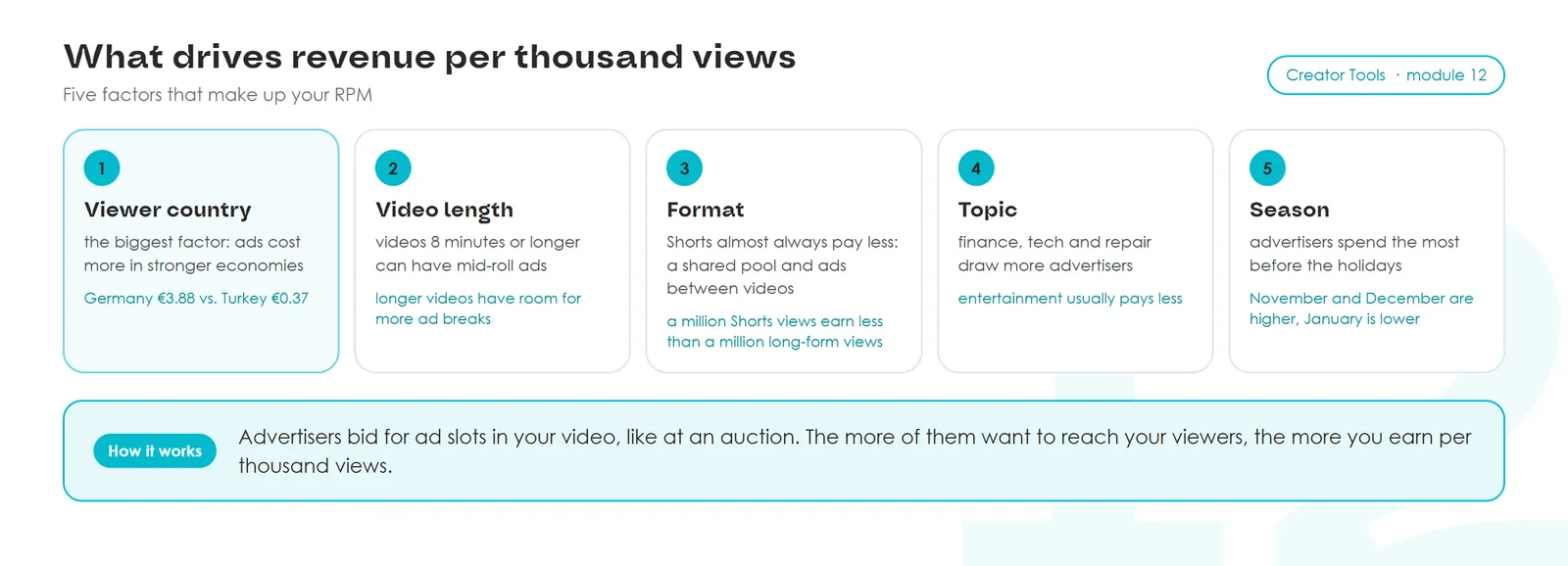
Advertisers want to reach specific people: people in Germany, people into cooking, bike owners in the US. Advertisers bid for every ad slot in your video, auction-style. The more advertisers want your viewer, the more each impression costs. That's where RPM comes from.
What different countries pay
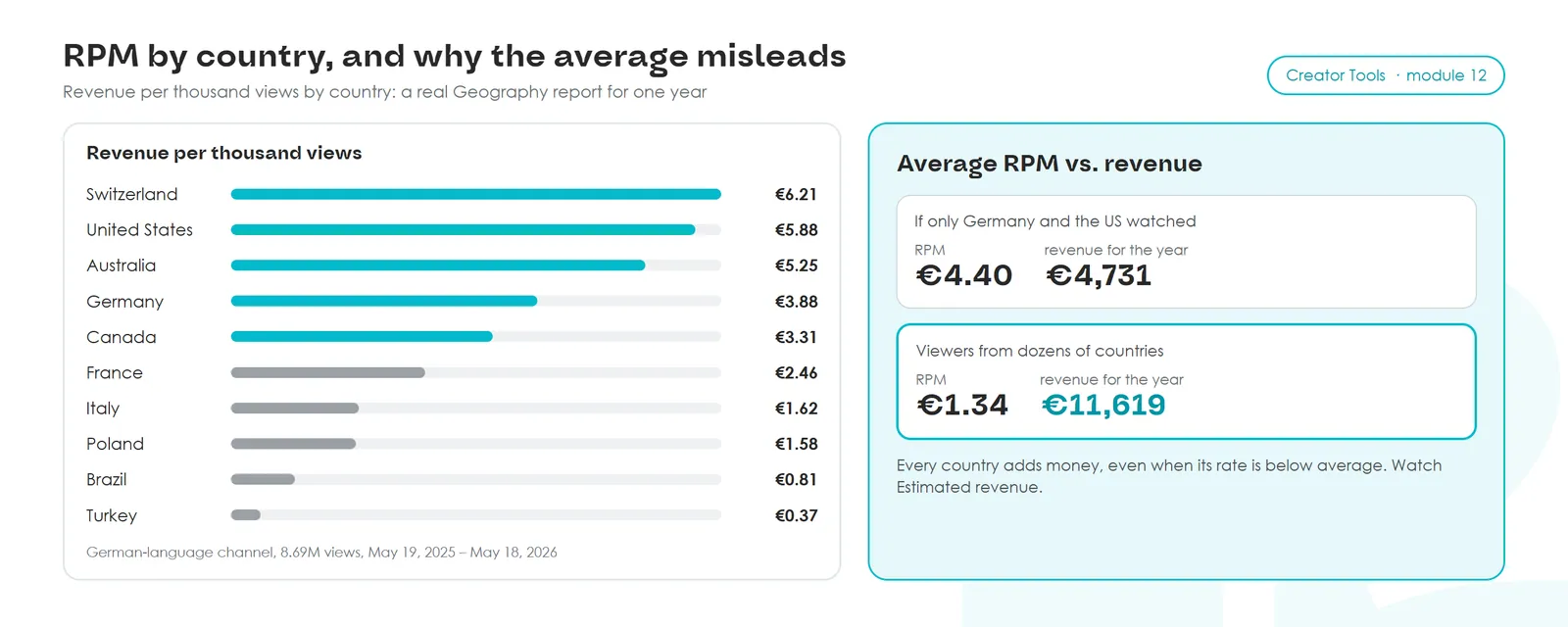
Here's a real Geography report with Estimated revenue for one of our German-language channels over a year. The channel's videos are translated into dozens of languages: titles, descriptions and subtitles.
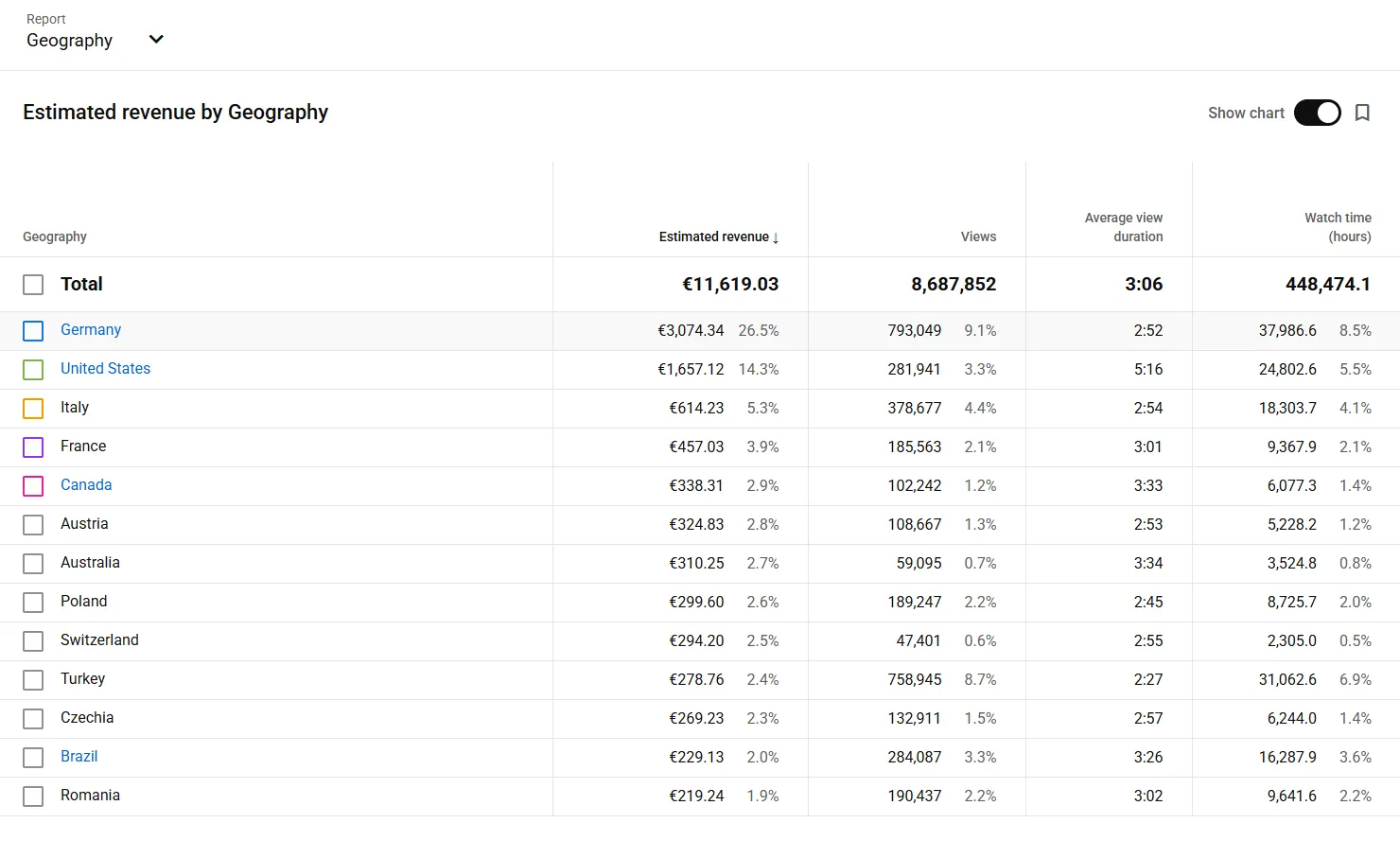
Divide each country's revenue by its views and multiply by a thousand, and you get RPM by country:
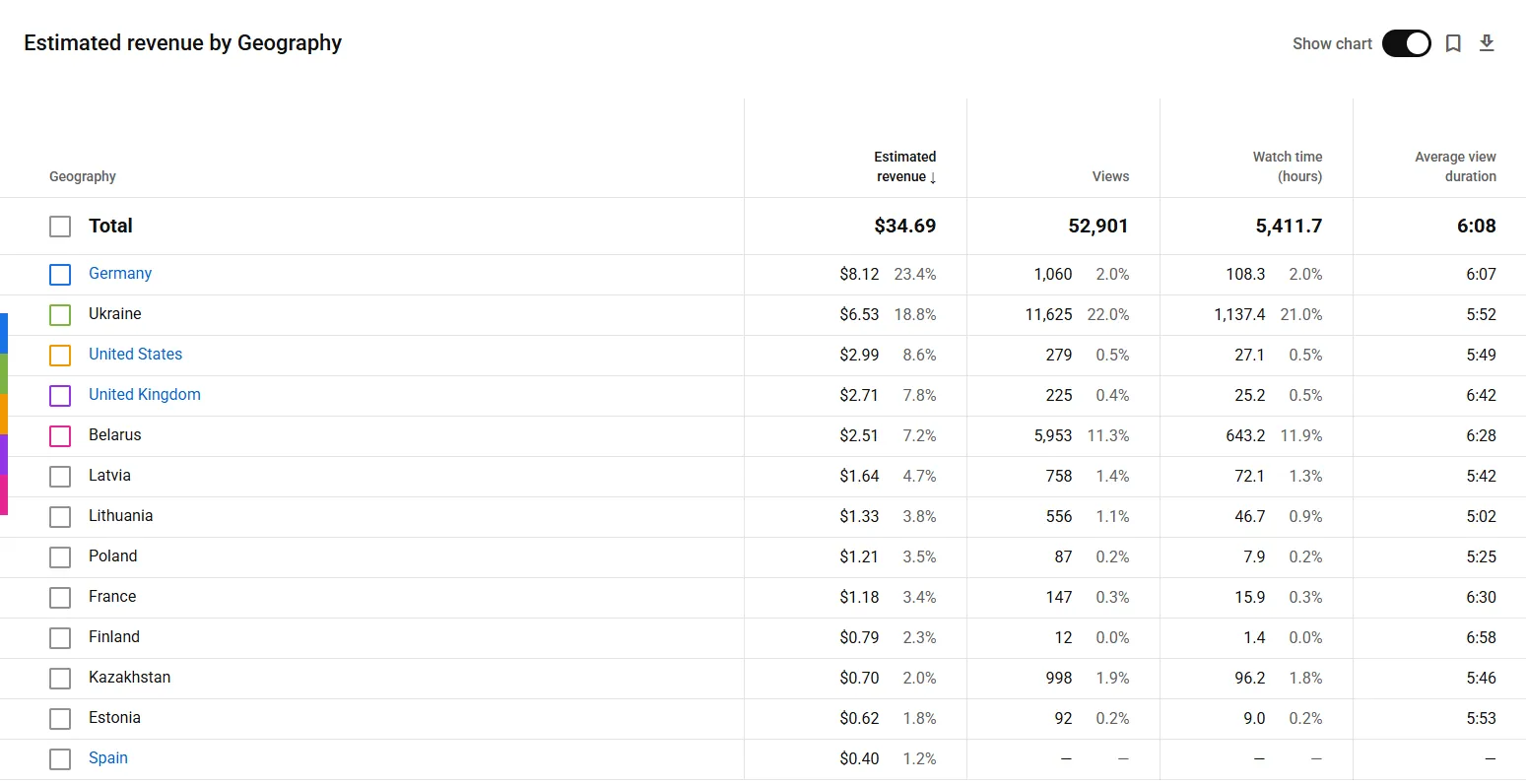
A small Russian-language channel shows the same pattern with smaller numbers. Over eight months, 1,060 views from Germany earned $8.12, while 11,625 views from Ukraine earned $6.53. A thousand views from Germany came to more than $7, from Ukraine, Belarus and Kazakhstan less than a dollar.
Across our channels the spread looks like this. US, Switzerland, Australia, UK: $5 to $12 per thousand. Germany, Canada, Northern Europe: $3 to $8. France, Poland, Italy, the Baltics: $1.50–$3. Brazil, Turkey, Ukraine, Belarus, Kazakhstan: usually under a dollar. Your channel's order of countries will look similar. The pictures above are in euros, and €1 is roughly $1.10–$1.20.
How people twist this
Studio shows one RPM for the whole channel. That's an average: all revenue divided by all views, and that's what the manipulation rests on. Courses say: "Viewers from poor countries are ruining your RPM. Don't translate into Turkish or Portuguese, it'll drag the number down."
The number goes down and the money goes up. Let's do the math on the same German channel.
- If only Germany and the US watched, RPM would be €4.40, a pretty number. Revenue for the year: €4,731.
- The channel is watched in dozens of countries, RPM €1.34, a number those courses would call bad. Revenue for the year: €11,619, two and a half times more. Germany and the US brought in about 40% of it, and the rest came from countries that watch through translations.
Turkey brought 759,000 views at €0.37 per thousand. The average RPM dropped because of it, and €279 of extra money landed in the account. Every new country adds money even when its rate is below average: new views simply stack on top of what you already earn.
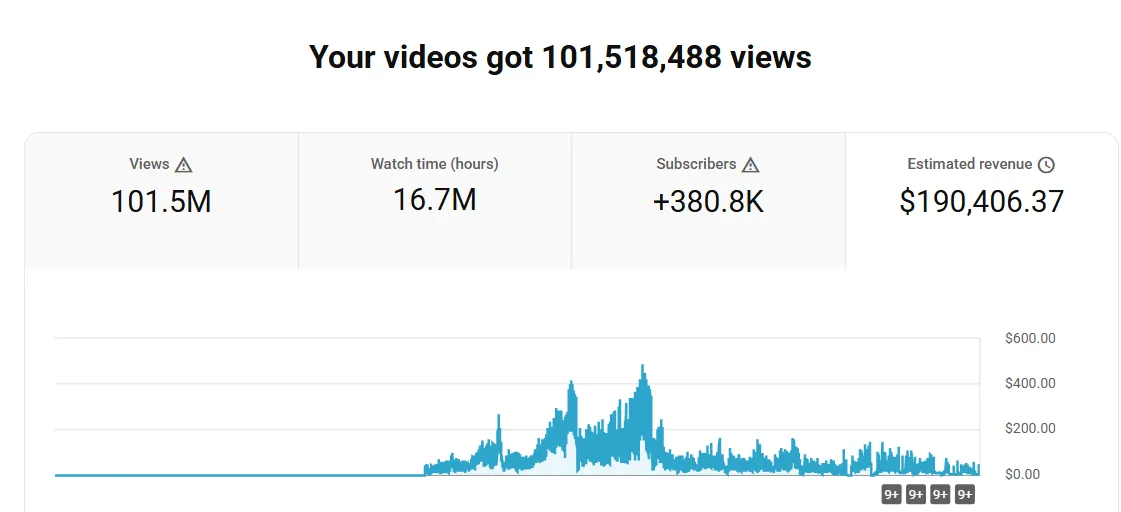
When a creator has viewers in a hundred countries at different rates, the overall RPM can be far from $15 per thousand while revenue is higher than on a single-country channel with a high RPM. Look at Estimated revenue. RPM only tells you which countries bring in more money.
How to add countries
Every new country brings new viewers and new money on top. A viewer in Germany, Brazil or Japan clicks if they understand the title and keeps watching if they can turn on subtitles in their language. In Module 11 we saw a channel report where two thirds of the views came with subtitles in other languages.
Translating titles, descriptions and subtitles into dozens of languages by hand takes ages. That's why we built Creator Tools: pick your videos and languages, and the translations go straight into Studio. We'll go through it step by step in Module 14.
Do it now. If you're already in the program, open Analytics and click Advanced mode in the top right. In the report menu choose Geography, the metric Estimated revenue and the period Last year. Divide the revenue of your top three countries by their views and multiply by a thousand. Where is your most valuable thousand views? If you're not in the program yet, look at views in the same report: which countries already watch you?
10. What else earns money around the channel
Beyond the Partner Program, creators have income that never goes through YouTube at all. In Module 1 we called it external monetization. It often starts before ads do.
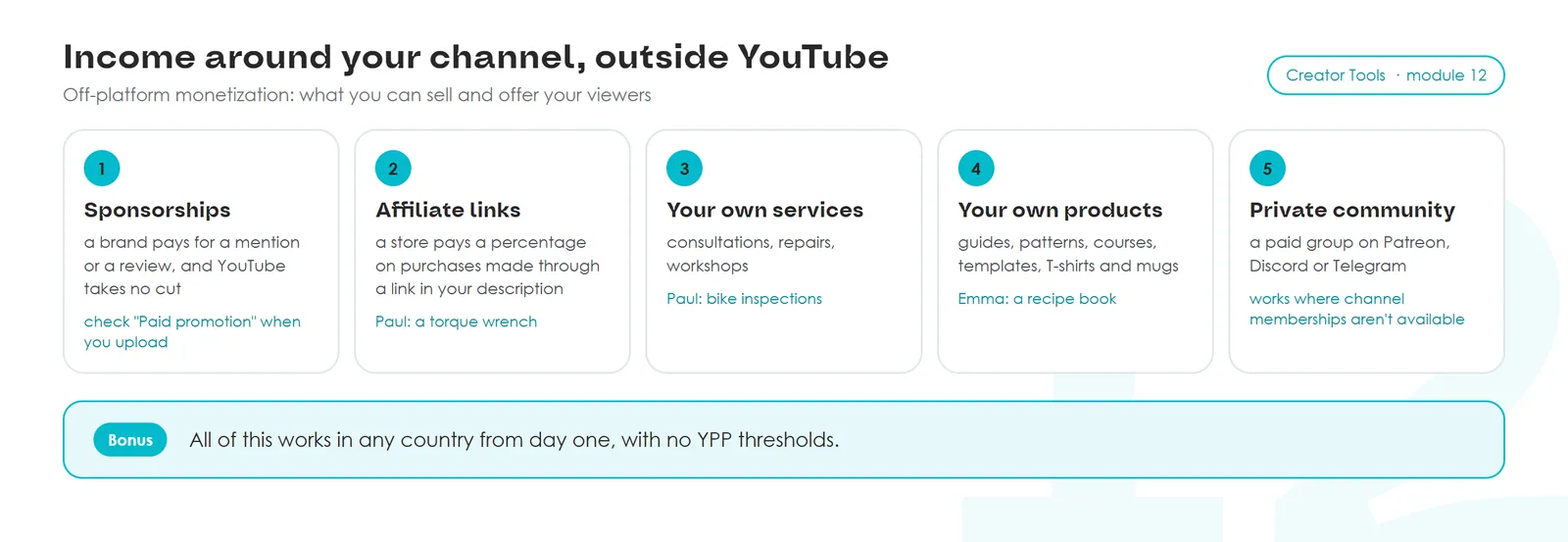
If a brand pays for a mention in your video, scroll down on the Details step during upload to Paid promotion and check "My video contains paid promotion like a product placement, sponsorship or endorsement." Viewers will see a label. YouTube requires it.
The right mix depends on your topic and what you enjoy doing. Paul leans toward services, Emma toward recipes and cookware sponsorships, an AI tools reviewer toward affiliate links to software.
11. How much you can earn
Almost everyone starts at zero, and that's normal.
After that it varies. Some people make $80 in their first month from one sponsored segment or affiliate link. Others reach $80 a month after a year. Among our users there are creators earning $300 a month and creators earning $10,000. Nobody can tell you in advance what you'll make. Whoever promises an exact number is usually selling a course with a "secret system" and making their money off you.
Your own videos, the advice in this course and translations into other languages bring more viewers from more countries, and that's what revenue depends on.
12. Beginner monetization mistakes
- Buying hours and subscribers. Bots don't watch ads. YouTube removes fake views, and for fake engagement it kicks channels out of the program or deletes them.
- A channel just for the money in a high-CPM niche. The creator picks crypto or insurance for the expensive ads without knowing the subject. The videos come out empty, viewers feel it and leave, nothing works. A couple of months later burnout shows up too.
- Re-cut content from others. Rejection, then removal from the program for repeat violations, and if the creator opens new channels to get around it, every one of their channels gets deleted.
- Popular music in the background. The video's ad revenue usually goes to the copyright owner.
- Betting only on ads. The creator waits for the threshold and never tries affiliate links, sponsorships or their own services, which work from day one.
- A made-up country or someone else's passport in your own AdSense. Sooner or later Google asks for an ID. If the details don't match, the money gets frozen.
- Swearing and shock at the start of a video. The video gets a yellow icon and shows far fewer ads.
- Chasing average RPM. The creator turns away viewers from low-rate countries and loses the money they brought in.
- "Everything's closed in my country, there's no point." That thought kills channels that could have reached viewers in other countries.
13. Practice
Fill in the "Monetization map" form in the interactive version of the lesson. Have ready:
- Three numbers from the Earn page in Studio: subscribers, hours over 365 days, Shorts views over 90 days.
- How many subscribers and hours you gained in a month: note the Earn page numbers today and again in a month.
- Three revenue sources from section 5 and one or two from section 10 that fit your topic.
- If you're already in the program: RPM for your top three countries from the Geography report.
- If monetization isn't available in your country: a route from section 8 or an option from section 10, plus a first step.
14. In short
Bring your numbers to the chat
I'm Ihar, the author of this course. Open the Earn page in Studio, see how far you are from the first tier, and pick two or three ways to earn from this lesson. Bring your numbers to the chat and we'll work out your timeline and where to start on your channel.