Made with YouTube API
Setup in 2 min
140+ Languages Auto-Detected
Reply to YouTube comments in 140+ languages automatically, in your voice.
Unanswered comments are hurting your reach. Spend less time on manual replies. Engage global viewers in their language — 24/7, while you stay focused on creating.
· 200 replies free · No credit card · Cancel anytime
15M+
Replies published for creators
real replies your viewers received
Zero
Channel bans
built with the official API and platform guidelines
140+
Languages supported
automatically detected, including non-Latin alphabets
Since 2023
No price changes
fixed pricing with 30-day notice
See it in action. No sign-up
It works just like YouTube: a video on top, comments below. Pick a language and tone, and watch Creator Tools write the reply your viewers will see.
One way keeps you in the comments. The other lets you create.
Replying by hand doesn't scale. Not your time, not your audience. See what changes on autopilot.
.webp)
The Old Way
Hours every week spent replying one by one
Comments in other languages go unanswered
Copy paste replies that sound like a bot
Miss a day and the queue keeps growing
Unofficial methods that risk your channel
Per channel pricing that grows with you
.webp)
The Creator Tools Way
Autopilot replies every 10 minutes, 24/7
140+ languages, answered natively
Replies in your voice, never like a bot
Runs without you, or review drafts first
Official YouTube API. Zero channel bans
One flat price for unlimited channels
New comments keep coming. The only question is who answers them.
Setup in 3 clicks. First reply in 2 minutes.
If you can use YouTube Studio, you already know how to use Creator Tools.
Connect your channel
Sign in with the official YouTube OAuth. We only access your comments. Never your videos, settings, or password.
OAuth 2.0 security
Comments only
Choose your tone
Describe how you want to sound or pick one of 48 ready-made styles. Every reply follows your voice automatically.
48 tone presets
Custom instructions
Launch autopilot
Autopilot checks for new comments every 10 minutes and replies automatically. Prefer to approve first? Turn on Draft mode.
Runs 24/7
One-click pause
Your audience speaks every language. Now so do you.
You don't speak Japanese, Arabic or Korean. Your viewers do — and each one gets a native reply in their language that sounds like you, never a word-for-word translation.
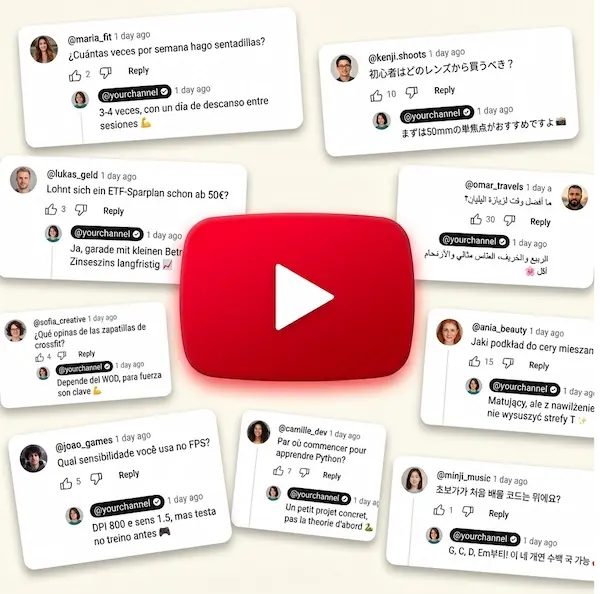
What changes after you turn it on.
More conversations. More time. Still your voice.
Your audience gets real replies
Every language. Every comment.
German, French, Japanese and 140+ more. Every comment is detected automatically and answered in the viewer's own language.
Native replies build trust
Better engagement signals
No translating. No switching languages.
Your time comes back
Comments stop feeling like a second job.
Autopilot checks for new comments every 10 minutes and replies automatically, so the queue never builds up.
Focus on your biggest fans
More time to create
Runs 24/7
Sounds like you
Not like another AI.
The AI understands your video, comment and your writing style before it replies.
No generic templates
Your tone, every time
Stays polite, even with toxic comments
What creators tell us. Privately.
Our customers don't do public case studies. Their viewers believe they answer every comment personally — and we intend to keep it that way. No names. No channel links. Nothing that could identify them. These are real messages from our inbox, shared with permission and lightly edited to protect our customers' privacy.
Signed up mostly to prove it wouldn't work. Tried the 200 free replies. Picked the worst comments I had.
It answered a genuinely rude one so calmly I kept it word for word.
…fine.
You win.
DIY & crafts
it's damn smart))
by comment 40 i'm not even trying anymore 😅
i'm typing "thanks!"
"glad you liked it!"
on autopilot, over and over
meanwhile the ai somehow sounds more creative than i would )))
because let's be honest...
after a long day i'd be lazy but it never phones it in.
Gaming channel
I don't speak half the languages my viewers write in. So I genuinely didn't trust the translations. Opened DeepL and compared the replies one by one. Expected to rewrite at least a few. Didn't touch a single one. They're lively and to the point, like a person actually wrote them. Haven't checked one since.
Travel vlogger
I was ready to babysit this thing for a week 😂
Instead it somehow picked up the way I write
even the ridiculous amount of emojis I use.
It's really as if you're developing it just for me ))))
I keep waiting for one reply that sounds robotic. Still waiting for the first one.
Beauty creator
This was honestly my biggest fear that someone would drop a "this is AI" in the comments. Three weeks in and nobody noticed. That was kind of the whole point.
Lifestyle creator
Finished editing.
Looked at the clock.
Closed the laptop.
Then realized: there wasn't a single unanswered comment waiting for me. Haven't had an evening like that in months.
Cooking channel
The best compliment we've ever gotten: nobody noticed.
What do YouTube comments really cost you?
Enter two numbers. See what replying manually costs you every month.
Real questions.
Honest answers.
Your viewers are commenting right now. Answer all of them — tonight.
Connect your channel, set your voice, and watch the first replies go out in 2 minutes. 200 replies free — enough to see it work on your real audience.


