How to Respond to YouTube Comments and Why It Matters
Growing on YouTube isn't just about gaining subscribers and racking up views — it's about building a real connection with your audience. Replying to comments is one of the most direct ways to do that, and engagement is the engine that drives more views.

Tired of spending hours replying to your subscribers? Now AI does it for you, so you can focus on what you do best — creating content. Fast, efficient, and always on: our AI responds to viewer comments automatically, saving you time without sacrificing authenticity.
How It Works
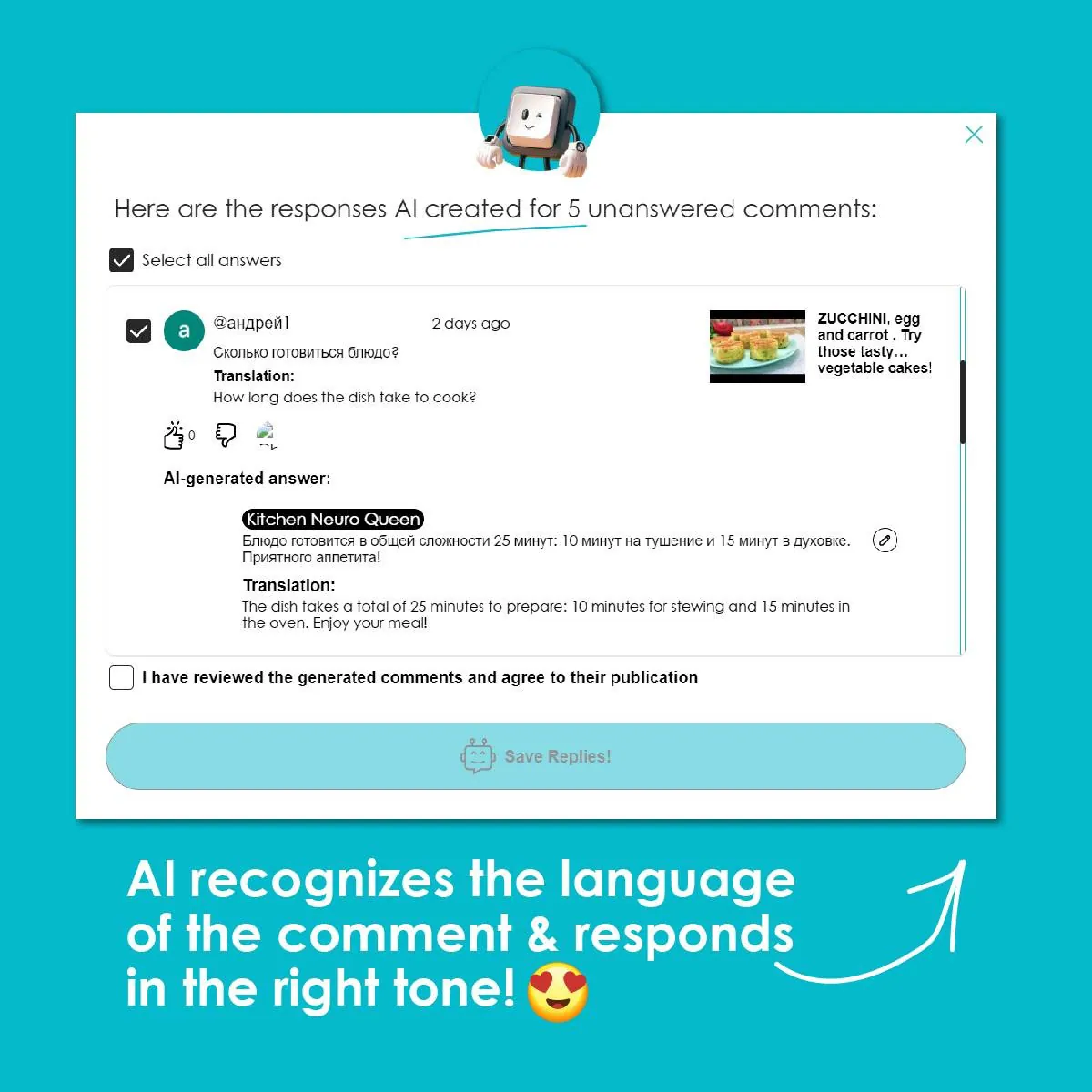
Our AI analyzes each comment, detects its language, and crafts a meaningful response that reflects your brand or personal style. You choose the role — male, female, or company — along with the tone and form of address, and the AI handles the rest. Every reply is generated with the video's context in mind, so responses stay relevant and feel natural.
Creator Tools replies to your viewers' comments in your own voice and in each commenter’s language. The first 200 replies are free, no credit card needed.
What Creator Tools AI Can Do
Handles Negativity Gracefully
The AI recognizes hateful or hostile comments and responds calmly and professionally — keeping your channel's tone positive without you having to step in.
Goes Beyond "Thank You"
Instead of generic replies, the AI generates thoughtful, context-aware responses that show viewers their comments were actually read. This builds trust and encourages more interaction.
Communicates Across Languages
The AI replies in the language of each comment, and you can translate incoming comments into your own language to read them, so your international audience always feels included — no matter what language they write in.
What's New
Every Creator Tools user now gets 200 free auto-replies to comments — no setup required. Need more? Additional reply packages are available for purchase.
Users who participated in early testing receive double their first purchase as a thank-you for helping shape the feature.


Start Engaging Your Audience Today
Don't miss the opportunity to stay consistently connected with your viewers — effortlessly and at scale. Try AI comment responses from Creator Tools and turn routine replies into genuine engagement.

FAQ
Does replying to YouTube comments help your channel?
Yes. Replying to comments is one of the most direct ways to build a real connection with your audience, and that engagement is the engine that drives more views.
How should you respond to negative YouTube comments?
Calmly and professionally. Creator Tools AI recognizes hateful or hostile comments and answers them politely, which keeps your channel's tone positive without you having to step in.
Can AI respond to YouTube comments in other languages?
Yes. The AI detects the language of each comment and replies in that language, and you can translate the comment into your own language to read it, so international viewers feel included.