Take Your YouTube Blog or Business to the Next Level with Creator Tools!
Hi! We are the Creator Tools team, and we build tools that make life easier for content creators and help them earn more.
Ready to elevate your blog or business? Our suite of tools is designed to help you do exactly that.

Creator Tools Translator
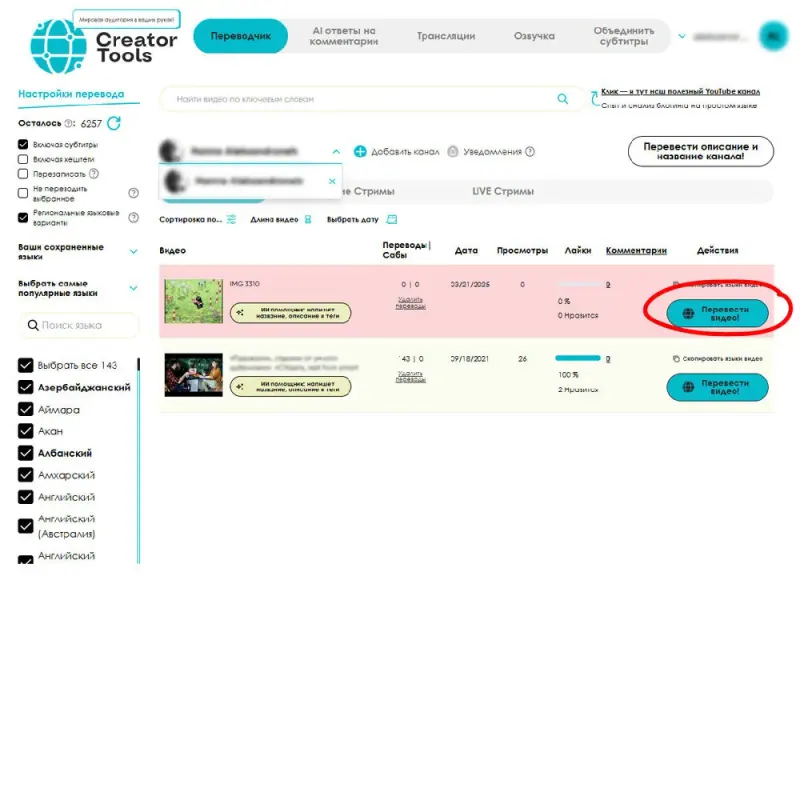
Translate your video's title, description, and subtitles into any of 140+ languages in just two clicks. This saves you time and opens the door to the international market.
Creator Tools Speaker
Voice your videos quickly and easily with the help of artificial intelligence. Our voiceover tool supports 44 languages and works for YouTube, TikTok, and Instagram videos, podcasts on any platform (YouTube, SoundCloud, Apple Podcasts, and more), as well as streams and online courses.
Creator Tools Subtitles
Effortlessly merge subtitles from different .srt and .vtt files to perfectly match your video — simple and convenient.
Which Tool Fits Your Goal?
You rarely need every tool on day one. Start from the problem you actually have, then pick the tool that solves it:
- Your videos get views at home but almost none from other countries. Start with the Translator. Viewers abroad search and browse in their own language, so a title and description they can read is the first thing that has to change.
- You have a script or subtitles but no time, studio or voice to record another language. Use Speaker: upload an .srt or .txt file or paste the text, choose a voice, and download the voiceover as an .mp3 that follows your subtitle timing.
- You have subtitle pieces scattered across several files. Merge them into one clean track before you publish or translate it, so every language starts from the same source.
A Simple Workflow for One Video
Here is an order of work that keeps things manageable, whether you publish once a week or once a month:
- Publish with good subtitles in your own language. Upload your own file or correct YouTube's automatic captions. Translations are only as good as the subtitles they start from.
- Translate the title, description and subtitles. Begin with the two or three languages where your analytics already show some viewers, rather than with the biggest languages in the world.
- Add a voiceover where the audio matters. For tutorials, courses and podcasts, a voiced version in a second language can help people who prefer listening to reading.
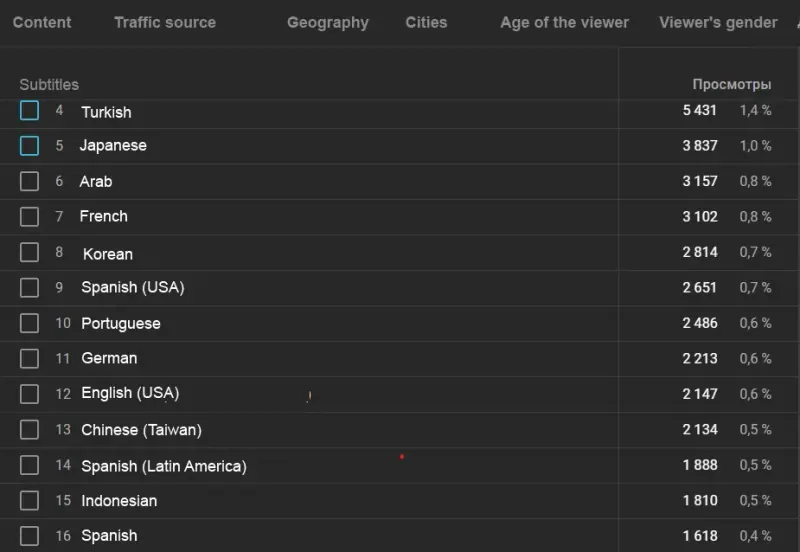
- Check the result after a few weeks. In YouTube Analytics, look at viewer geography and subtitle languages to see which translations are actually being used, then add or drop languages.
Do not forget the channel itself: YouTube lets you add a translated channel name and description too, so visitors from other countries understand at a glance what your channel offers.
How Different Creators Use the Tools
Bloggers and Vloggers
Personal channels usually win the most from translated titles and subtitles: the face and the voice stay the same, while viewers in other countries can finally understand what the video is about and follow along.
Course Authors and Educators
Lessons are long and full of terms, so accurate subtitles matter more than anywhere else. A voiceover in a second language turns one recorded course into an option for students who would not sit through hours of reading.
Podcasters
Many podcasts are published on YouTube as video. A translated title and description help the episode surface in search, and a voiceover lets you test a second-language feed without booking another recording session.
Small Businesses and Brands
Product demos, how-to videos and reviews stay useful for years. Translating them once keeps working for every new customer who finds them, which makes it one of the cheapest ways to support sales abroad.
Common Mistakes When Going International
- Translating only the title and leaving the description and subtitles in one language, so viewers click and then leave.
- Picking languages at random instead of starting where some audience already exists.
- Letting brand names, product names or catchphrases get translated. In the Translator, wrap them in [[double brackets]] and they stay exactly as written.
- Never looking at the results. Without checking analytics, you cannot tell which languages are worth keeping.
- Expecting overnight results. Translated videos need time to be found, just like your original uploads did.
The world audience is in your hands. Visit our website and try our tools for free.
Don't miss the opportunity to expand your reach and connect with new audiences. Feel free to reach out if you have any questions or need assistance — let's work together to make your content accessible to viewers worldwide.